预订映射视图 /DMO/C_BOOKING_APPROVER_M
ABAP RESTful 应用程序编程模型 › 开发 › 开发应用程序 › 开发托管事务应用 › 开发灵活服务使用的预测层 › 提供用于投影的数据模型 › 审批人业务对象预测的映射视图 › 定义审批人预测视图的数据模型 › 预订映射视图 /DMO/C_BOOKING_APPROVER_M
要为定义审批人应用程序范围的业务对象映射定义数据模型,需要执行以下任务:
为审批人创建投影 CDS 视图
审批人的 UI 服务范围比处理人的范围更有限。审批人只能通过接受或拒绝差旅条目来修改差旅实体。相应登记条目中的值是此决策的基础。只有这两个实体与审批人应用相关。这意味着,仅必须为审批人业务对象预测预测这两个实体。
对于以下 CDS 视图,通过在数据定义的创建向导中选择映射视图模板创建相应的映射视图。
|
业务对象结构的 CDS 视图 |
/DMO/I_TRAVEL_M |
/DMO/I_BOOKING_M |
|
业务对象映射的 CDS 视图 |
/DMO/C_TRAVEL_APPROVER_M |
/DMO/C_BOOKING_APPROVER_M |
备注
名称根据映射视图的命名规则进行分配:开发对象的命名规则。
生成的 CDS 映射视图必须具有以下语法:
define [root] view entity <projection_view>
  [provider contract transactional_query]
  as projection on <projected_view>
有关映射视图中语法的详细信息,请参阅将视图实体定义为映射(ABAP 关键字文档)。
定义审批人预测视图的数据模型
以下主题为您提供有关如何为审批人的业务对象映射中使用的 CDS 投影视图定义数据模型的详细描述。
差旅预测视图 /DMO/C_TRAVEL_APPROVER_M
对于服务特定投影,必须定义审批人 BO 投影的元素以及所有 UI 细节。
数据模型定义为 UI 服务公开的元素。此外,在数据定义中,必须定义所有 UI 规范。
通过在审批人的 CDS 差旅预测视图中实施相应功能来实现以下 UI。
预览:审批人的 UI 应用程序
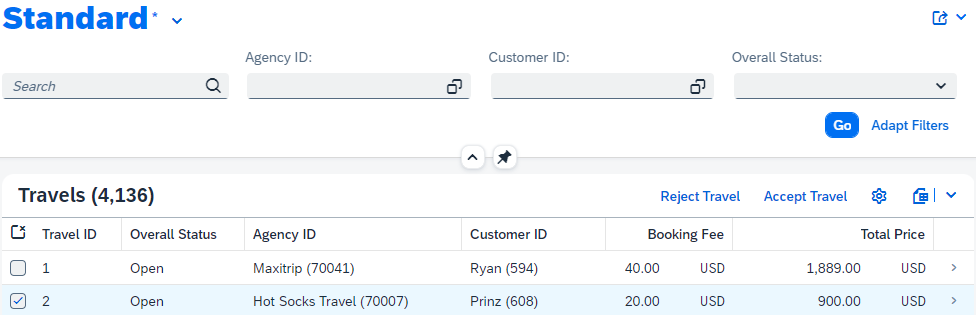
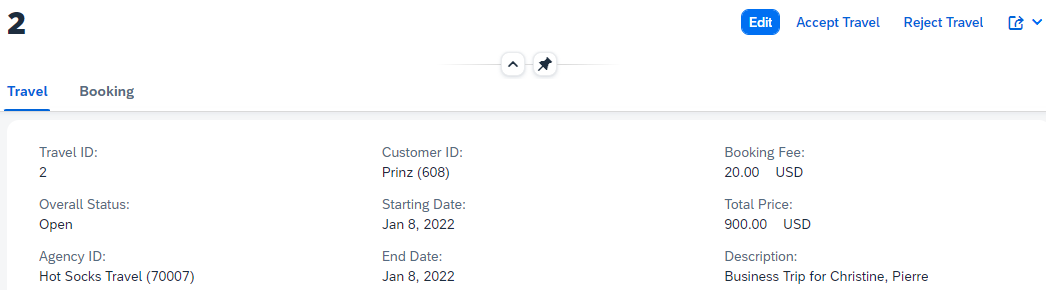
展开以下代码示例以查看差旅预测视图 /DMO/C_Travel_Approver_m 的源代码。
示例代码
@EndUserText.label: 'Travel projection view'
@AccessControl.authorizationCheck: #NOT_REQUIRED

@UI: {
  headerInfo: { typeName: 'Travel', typeNamePlural: 'Travels', title: { type: #STANDARD, value: 'TravelID' } } }

@Search.searchable: true

define root view entity /DMO/C_Travel_Approver_M
  provider contract transactional_query
  as projection on /DMO/I_Travel_M
{
      @UI.facet: [ { id:              'Travel',
                     purpose:         #STANDARD,
                     type:            #IDENTIFICATION_REFERENCE,
                     label:           'Travel',
                     position:        10 } ,
                   { id:              'Booking',
                     purpose:         #STANDARD,
                     type:            #LINEITEM_REFERENCE,
                     label:           'Booking',
                     position:        20,
                     targetElement:   '_Booking'}]

      @UI: {
          lineItem:       [ { position: 10, importance: #HIGH } ],
          identification: [ { position: 10 } ] }
      @Search.defaultSearchElement: true
  key travel_id          as TravelID,

      @UI: {
          lineItem:       [ { position: 20, importance: #HIGH } ],
          identification: [ { position: 20 } ],
          selectionField: [ { position: 20 } ] }
      @Consumption.valueHelpDefinition: [ { entity : {name: '/DMO/I_Agency', element: 'AgencyID'  } } ]

      @ObjectModel.text.element: ['AgencyName']
      @Search.defaultSearchElement: true
      agency_id          as AgencyID,
      _Agency.Name       as AgencyName,

      @UI: {
          lineItem:       [ { position: 30, importance: #HIGH } ],
          identification: [ { position: 30 } ],
          selectionField: [ { position: 30 } ] }
      @Consumption.valueHelpDefinition: [ { entity : {name: '/DMO/I_Customer', element: 'CustomerID'  } } ]

      @ObjectModel.text.element: ['CustomerName']
      @Search.defaultSearchElement: true
      customer_id        as CustomerID,
      _Customer.LastName as CustomerName,

      @UI: {
          identification:[ { position: 40 } ] }
      begin_date         as BeginDate,

      @UI: {
          identification:[ { position: 41 } ] }
      end_date           as EndDate,

      @UI: {
          lineItem:       [ { position: 42, importance: #MEDIUM } ],
          identification: [ { position: 42 } ] }
      @Semantics.amount.currencyCode: 'CurrencyCode'
      booking_fee        as BookingFee,

      @UI: {
          lineItem:       [ { position: 43, importance: #MEDIUM } ],
          identification: [ { position: 43, label: 'Total Price' } ] }
      @Semantics.amount.currencyCode: 'CurrencyCode'
      total_price        as TotalPrice,

      @Consumption.valueHelpDefinition: [ {entity: {name: 'I_Currency', element: 'Currency' } } ]
      currency_code      as CurrencyCode,

      @UI: {
          lineItem:       [ { position: 15, importance: #HIGH },
                            { type: #FOR_ACTION, dataAction: 'acceptTravel', label: 'Accept Travel' },
                            { type: #FOR_ACTION, dataAction: 'rejectTravel', label: 'Reject Travel' } ],
          identification: [ { position: 15 },
                            { type: #FOR_ACTION, dataAction: 'acceptTravel', label: 'Accept Travel' },
                            { type: #FOR_ACTION, dataAction: 'rejectTravel', label: 'Reject Travel' } ] ,
          textArrangement: #TEXT_ONLY,
          selectionField: [ { position: 40 } ] }
      @EndUserText.label: 'Overall Status'
      @Consumption.valueHelpDefinition: [{ entity: { name: '/DMO/I_Overall_Status_VH', element: 'OverallStatus' }}]
      @ObjectModel.text.element: ['OverallStatusText']
      overall_status     as OverallStatus,

      @UI.hidden: true
      _OverallStatus._Text.Text as OverallStatusText : localized,

      @UI: {
          lineItem: [ { position: 45, importance: #MEDIUM } ],
          identification:[ { position: 45 } ] }
      description        as Description,

      /* Admininstrative fields */
      @UI.hidden: true
      last_changed_at    as LastChangedAt,

      /* Associations */
      _Booking : redirected to composition child /DMO/C_Booking_Approver_M,
      _Agency,
      _Customer,
      _OverallStatus
}
解释
除了处理人和审批人预测中不同的操作外,处理人和审批人业务对象的 CDS 投影视图相同。有关差旅预测视图的全面描述,请参阅说明。
操作
必须在 CDS 投影视图中定义操作按钮的位置和标签。如果是审批人,则与差旅实体集相关的可用操作为 Accept Travel 和 Reject Travel。这些操作的实施在行为池中完成,请参阅开发操作。这只是需要在映射视图中配置的 UI 外观。相应操作的操作按钮旨在显示在差旅列表报告页面和差旅对象页面上。这就是在列表项目和标识 UI 注释中使用注释的原因。在清单报表页面上执行操作时,必须选择差旅实例以为实例绑定操作分配实例。在对象页面上,应执行操作的实例已清除。有关定义操作按钮的注释的详细信息,请参阅启用 UI 使用的操作。
预订映射视图 /DMO/C_BOOKING_APPROVER_M
数据模型定义为 UI 服务公开的元素。此外,在数据定义中,必须定义所有 UI 规范。
预览:UI 应用程序审批人
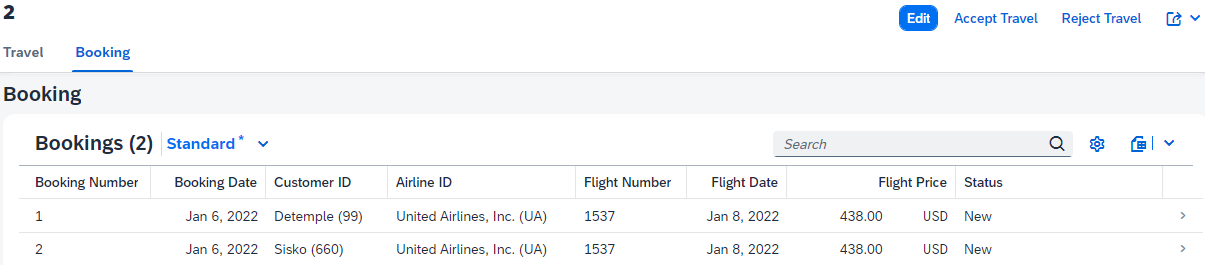
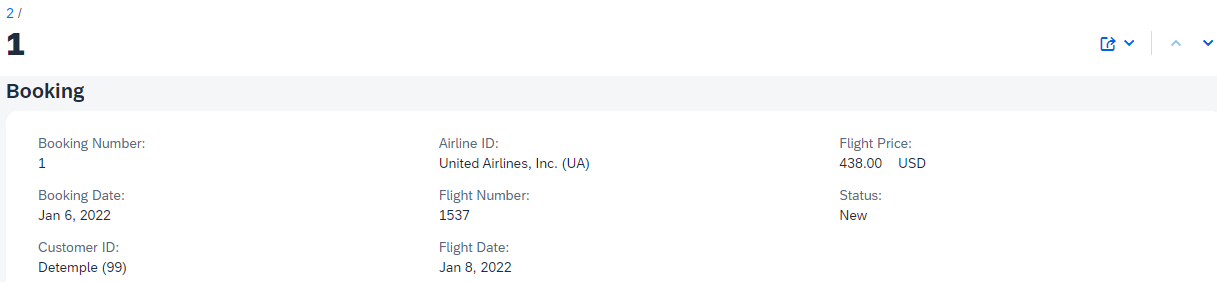
展开以下代码示例以查看预订映射视图 /DMO/C_Booking_Approver_M 的源代码。
示例代码
@EndUserText.label: 'Booking projection view'
@AccessControl.authorizationCheck: #NOT_REQUIRED

@UI: {
  headerInfo: { typeName: 'Booking',
                typeNamePlural: 'Bookings',
                title: { type: #STANDARD, value: 'BookingID' }
  }
}

@Search.searchable: true

define view entity /DMO/C_Booking_Approver_M
  as projection on /DMO/I_Booking_M
{
      @UI.facet: [ { id:            'Booking',
                     purpose:       #STANDARD,
                     type:          #IDENTIFICATION_REFERENCE,
                     label:         'Booking',
                     position:      10 }]

      @Search.defaultSearchElement: true
  key travel_id          as TravelID,

      @UI: { lineItem:       [ { position: 20, importance: #HIGH } ],
             identification: [ { position: 20 } ] }
      @Search.defaultSearchElement: true
  key booking_id         as BookingID,

      @UI: { lineItem:       [ { position: 30, importance: #HIGH } ],
             identification: [ { position: 30 } ] }
      booking_date       as BookingDate,

      @UI: { lineItem:       [ { position: 40, importance: #HIGH } ],
             identification: [ { position: 40 } ],
             selectionField: [{ position: 10 }]
              }
      @ObjectModel.text.element: ['CustomerName']
      @Search.defaultSearchElement: true
      customer_id        as CustomerID,
      _Customer.LastName as CustomerName,

      @UI: { lineItem:       [ { position: 50, importance: #HIGH } ],
             identification: [ { position: 50 } ] }
      @ObjectModel.text.element: ['CarrierName']
      carrier_id         as CarrierID,
      _Carrier.Name      as CarrierName,

      @UI: { lineItem:       [ { position: 60, importance: #HIGH } ],
             identification: [ { position: 60 } ] }
      connection_id      as ConnectionID,

      @UI: { lineItem:       [ { position: 70, importance: #HIGH } ],
             identification: [ { position: 70 } ] }
      flight_date        as FlightDate,

      @UI: { lineItem:       [ { position: 80, importance: #HIGH } ],
             identification: [ { position: 80 } ] }
      @Semantics.amount.currencyCode: 'CurrencyCode'
      flight_price       as FlightPrice,

      currency_code      as CurrencyCode,

      @UI: { lineItem:       [ { position: 90, importance: #HIGH, label: 'Status' } ],
             identification: [ { position: 90, label: 'Status' } ],
             textArrangement: #TEXT_ONLY }
      @Consumption.valueHelpDefinition: [{ entity: { name: '/DMO/I_Booking_Status_VH', element: 'BookingStatus' }}]
      @ObjectModel.text.element: ['BookingStatusText']
      booking_status     as BookingStatus,

      @UI.hidden: true
      _BookingStatus._Text.Text as BookingStatusText : localized,

      /* Admininstrative fields */
      @UI.hidden: true
      last_changed_at    as LastChangedAt,

      /* Associations */
      _Travel : redirected to parent /DMO/C_Travel_Approver_M,
      _Customer,
      _Carrier,
      _BookingStatus

}
解释
处理人和审批人业务对象的 CDS 映射视图几乎相同。有关预订投影视图的全面描述,请参阅预订投影视图 /DMO/C_BOOKING_PROCESSOR_M。
来源:SAP Help Portal · 2025 FPS02 (Oct 2026) · 中文为 SAP 官方机器翻译