覆盖默认字段标签
ABAP RESTful 应用程序编程模型 › 开发 › 开发 UI 特定 › 定义元数据驱动的 UI 的 CDS 注释 › UI 上的字段 › 覆盖默认字段标签
如何使用 CDS 中的 UI 注释覆盖 UI 上的缺省字段标签。
快捷信息
注释语法 |
|
|---|---|
描述 |
定义显示的字段标签。 否决从 CDS 注释 |
使用 |
置于元素列表部分,在每个相应元素之前。 |
相关主题 |
注释语法 |
|
|---|---|
描述 |
定义显示的字段标签。 否决从 CDS 注释 |
使用 |
置于元素列表部分,在每个相应元素之前。 |
相关主题 |
Fiori UI 上的预览
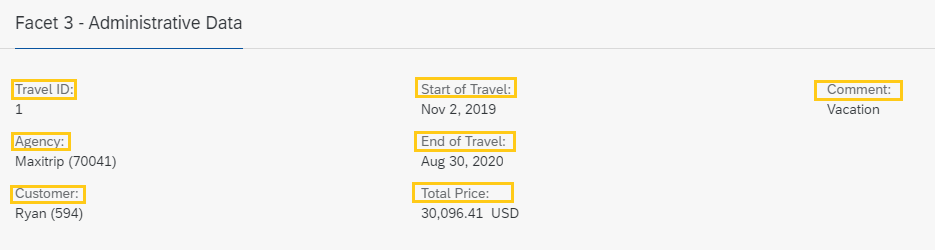

上下文和使用
默认情况下,已公开 CDS 元素的标签派生自 ABAP 字典中的数据元素标签,如果已定义,则派生自 CDS 注释 @EndUserText.label。您可以使用 UI 上的子注释 label 覆盖 @EndUserText.label 定义的数据元素标签和标签。UI 注释的标签仅在 UI 上下文中使用,而 ABAP 字典或 @EndUserText.label 中的标签用于任何服务的服务文档中。子注释 label 可与多个 UI 注释一起使用,例如 @UI.identification 或 @UI.LineItem(请参阅上面的快速信息或 CDS 注释)。
在元素列表部分中,将注释放在要标记的相应元素之前。
代码片段
在此示例中,我们使用注释 @UI.identification.label 标记类型为 #IDENTIFICATION_REFERENCE 的构面的对象页面上显示的字段,如上面的第一个预览图所示。同样,我们使用注释 @UI.lineItem.label 标记列表报表的字段(即列),如上面的预览的第二张图所示。
在完整 UI 注释示例代码中查找差旅场景的元数据扩展文件。
展开以下代码示例以查看源代码以对视图 Z_C_TRAVEL_R 进行注释。
示例代码
...
annotate view Z_C_TRAVEL_R with

{
  ...
  // Body Facets (Object Page)
  ...
       // Facet 3

             { id:              'Facet3-ID',
               purpose:         #STANDARD,
               type:            #IDENTIFICATION_REFERENCE, // Refers to elements annotated with '@UI.identification' in the element list below
               label:           'Facet 3 - Overview and Comments',
               position:        30 }
             ]

  // ELEMENT LIST

  // No label defined.
  TravelID;

  @UI: { lineItem:       [ { label: 'Agency' } ],
         identification: [ { label: 'Agency' } ]
       }
  AgencyID;

  @UI: { lineItem:       [ { label: 'Customer' } ],
         identification: [ { label: 'Customer' } ]
       }
  CustomerID;

  @UI: { lineItem:       [ { label: 'Start of Travel' } ],
         identification: [ { label: 'Start of Travel' } ]
       }
  BeginDate;

  @UI: { lineItem:       [ { label: 'End of Travel' } ],
         identification: [ { label: 'End of Travel' } ]
       }
  EndDate;

  @UI: { hidden: true }
  BookingFee;

  // No label defined.
  TotalPrice;

  // Label only defined for identification field
  @UI: { identification: [ { label: 'Comment' } ]
  Memo;

  // Label only defined for line item field
  @UI: { lineItem:      [ { label: 'Set to Booked' } ]
  Status;
}
来源:SAP Help Portal · 2025 FPS02 (Oct 2026) · 中文为 SAP 官方机器翻译