使用构面更改对象页面布局
ABAP RESTful 应用程序编程模型 › 开发 › 开发 UI 特定 › 定义元数据驱动的 UI 的 CDS 注释 › 对象页面 › 使用构面更改对象页面布局
如何使用 CDS 中的构面操作 UI 的基本布局。
快捷信息
注释语法 |
|
|---|---|
描述 |
定义对象页面的构面。 |
使用 |
置于代码的构面定义节中。 |
相关主题 |
Fiori UI 上的预览
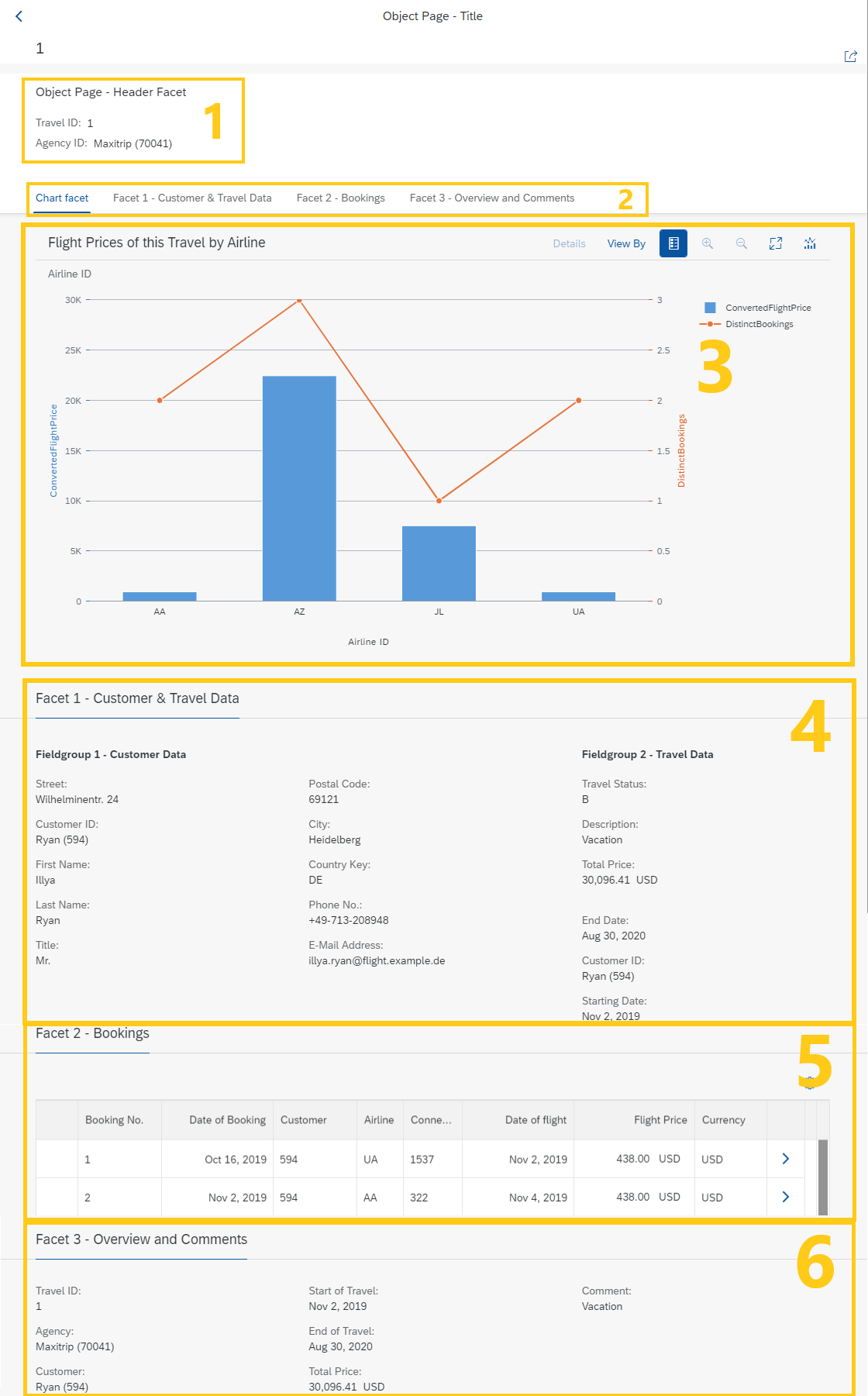
1 - 抬头构面(目的:#HEADER) 2 - 构面导航标签 3 - 图表构面(类型:#CHART_REFERENCE) 4 - 父构面(类型:#COLLECTION),包含两个子构面,即字段组 1 和字段组 2(类型:#FIELDGROUP_REFERENCE) 5 - 含表的构面(类型:#LINEITEM_REFERENCE) 6 - 含数组的构面(类型:#IDENTIFICATION_REFERENCE)
上下文和使用
构面可用于组织页面的基本布局,例如,在对象页面上。可以使用各种子注释细化 @UI.facet。将注释放在 CDS 数据定义或元数据扩展的构面部分中。
UI 构面的目的和类型
注释 @UI.facet.purpose 定义构面是抬头还是标准构面。另一方面,注释 @UI.facet.type 定义构面格式以及将在构面中显示的字段类型。
|
purpose: #HEADER |
在对象页面的抬头部分显示构面及其内容。 |
|
purpose: #STANDARD |
将其用于标准构面。大多数情况下可以省略。 |
|
type: #COLLECTION |
构面用作其他构面的父项(或容器)。子构面通过 'parentId' 引用父构面。 |
|
type: #FIELDGROUP_REFERENCE |
分配到字段组的元素的参考。 |
|
type: #IDENTIFICATION_REFERENCE |
引用使用 UI.identification 注释的元素。构面将以列表格式显示引用的元素。 |
|
type: #LINEITEM_REFERENCE |
引用使用 UI.lineItem 注释的元素。构面将以表格式显示引用的元素。 |
|
type: #CHART_REFERENCE |
引用使用 UI.chart 注释注释的统计图。构面将显示引用的统计图。有关更多信息,请参阅使用统计图可视化数据 |
|
hidden: true |
用于从页面视图中隐藏构面。例如,这些字段不显示,但仍可用于计算。 |
连接父构面和子构面
父构面使用 type: #COLLECTION 进行注释。要将其他构面嵌套到父构面中,必须使用下面的注释。
|
id: '...' |
唯一标识符。将子构面嵌套到 #COLLECTION 构面时需要。id 引用了 parentID 的值。 |
|
parentID: '...' |
子构面需要嵌套到 #COLLECTION 构面中。 |
将构面连接到字段组和其他目标
要从源中检索数据,必须在 构面中定义 targetElement。如果未定义 targetElement,则缺省目标是定义构面的实体。要将字段 嵌套到字段组中,必须定义构面的 targetQualifier。targetQualifier 的值由带有注释 @UI.fielgroup.qualifier 的字段引用。
|
targetElement: '…' |
从关联的数据定义中检索数据需要,例如 _Customer |
|
targetQualifier: '…' |
唯一标识符。将元素嵌套到字段组中时需要。 |
构面抬头和位置
要进一步定制布局,您可以定义每个构面的 label 和 position。缺省情况下,构面的位置将是它们在源代码中定义的顺序。
|
label: '…' |
构面抬头和导航标签中显示的标签。 |
|
position: <value> |
按 'position' 值的顺序对构面进行排序。有关详细信息,请参阅定位字段。 |
有关详细信息,请参阅 CDS 注释。
代码片段
在*完整 UI 注释示例代码*中查找差旅场景的元数据扩展文件。
展开以下代码示例以查看源代码以对视图 Z_UI_TRAVEL 进行注释。
示例代码
...
annotate view Z_UI_TRAVEL with

{
  //FACET SECTION

  @UI.facet: [

  // Header Facet (Object Page):

             { id:              'HeaderFacet',
               purpose:         #HEADER,
               type:            #FIELDGROUP_REFERENCE,
               label:           'Object Page - Header Facet',
               targetQualifier: 'HeaderItems', // Refers to lineItems with @UI.fieldGroup: [{qualifier: 'HeaderItems'}]
               position:         10 },

  // Body Facets (Object Page)

       // Facet for chart - charts can only be displayed in facets

             { id:              'Chart1-ID', // Facet for our Chart with type "#CHART_REFERENCE"
               purpose:         #STANDARD,
               type:            #CHART_REFERENCE,
               label:           'Chart facet',
               targetQualifier: 'Chart1',
               targetElement:   '_Booking', // Specifies where the data is retrieved from
               position:        1
             },

       // Facet 1 - Parent (collection) for Fieldgroup 1 and Fieldgroup 2

             { id:              'Facet1-ID',
               type:            #COLLECTION,
               label:           'Facet 1 - Customer & Travel Data',
               position:        10 },

       // Facet for Fieldgroup 1 - nested inside Facet 1

             { id:              'Fieldgroup1-ID',
               type:            #FIELDGROUP_REFERENCE,
               label:           'Fieldgroup 1 - Customer Data',
               parentId:        'Facet1-ID', // Places this facet into 'Facet 1'
               targetElement:   '_Customer', // Specifies where the data is retrieved from - UI annotations must be defined in the respective target
               targetQualifier: 'Fieldgroup1',
               position:         10 },

        // Facet for Fieldgroup 2 - nested inside Facet 1

             { id:              'Fieldgroup2-ID',
               type:            #FIELDGROUP_REFERENCE,
               label:           'Fieldgroup 2 - Travel Data',
               parentId:        'Facet1-ID', // Places this facet into 'Facet 1'
               targetQualifier: 'Fieldgroup2', // No targetElement defined. Default target is the entity in which the facet is defined.
               position:         20 },

       // Facet 2

             { id:              'Facet2-ID',
               type:            #LINEITEM_REFERENCE, // Facet shows the referenced items in a list report
               label:           'Facet 2 - Bookings',
               targetQualifier: 'Facet2',
               position:         20,
               targetElement:   '_Booking'},

       // Facet 3

             { id:              'Facet3-ID',
               purpose:         #STANDARD,
               type:            #IDENTIFICATION_REFERENCE, // Refers to elements annotated with '@UI.identification' in the element list below
               label:           'Facet 3 - Administration Data',
               position:        30 }
             ]

  // ELEMENT LIST

  @UI: { identification: [ { position: 10 } ],
         fieldGroup:     [ { qualifier: 'HeaderItems',
                            position: 10 } ] }
  TravelID;

  @UI: { identification: [ { position: 20} ],
         fieldGroup:     [ { qualifier: 'HeaderItems',
                             position: 20 } ] }
  AgencyID;

  @UI: { identification: [ { position: 30 } ],
         fieldGroup:     [ { qualifier: 'Fieldgroup2',
                             position: 10 } ] }
  CustomerID;

  @UI: { lineItem:       [ { position: 40,
                             qualifier: 'Facet2' } ],
         identification: [ { position: 40 } ] ,
         fieldGroup:     [ { qualifier: 'Fieldgroup2',
                             position: 10 } ] }
  BeginDate;

  @UI: { lineItem:       [ { position: 41,
                             importance: #MEDIUM,
                             qualifier: 'Facet2' } ],
         identification: [ { position: 41 } ],
         fieldGroup:     [ { qualifier: 'Fieldgroup2',
                             position: 10 } ] }
  EndDate;

  @UI: { hidden: true,
         identification: [ { position: 42 } ] ,
         fieldGroup:     [ { qualifier: 'Fieldgroup2',
                             position: 10 } ] }
  BookingFee;

  @UI: { identification: [ { position: 43 } ] ,
         fieldGroup:     [ { qualifier: 'Fieldgroup2',
                             position: 10 } ] }
  TotalPrice;

  @UI: { identification:[ { position: 45,
                            label: 'Comment' } ] ,
         fieldGroup:    [ { qualifier: 'Fieldgroup2',
                            position: 10 } ] }
  Memo;

  @UI: { fieldGroup:    [ { qualifier: 'Fieldgroup2',
                            position: 10 } ] }
  Status;
}
来源:SAP Help Portal · 2025 FPS02 (Oct 2026) · 中文为 SAP 官方机器翻译
← 定义对象页面的标题部分 · 隐藏对象页面上的字段 →