分组字段
ABAP RESTful 应用程序编程模型 › 开发 › 开发 UI 特定 › 定义元数据驱动的 UI 的 CDS 注释 › UI 上的字段 › 分组字段
如何使用字段组通过 CDS 中的 UI 注释在 UI 上构建内容。
快捷信息
注释语法 |
|
|---|---|
描述 |
在其他部分(如标题或构面)中排列组中的字段。 |
使用 |
置于代码的元素部分,在相应元素之前。 使用 |
相关主题 |
Fiori UI 上的预览
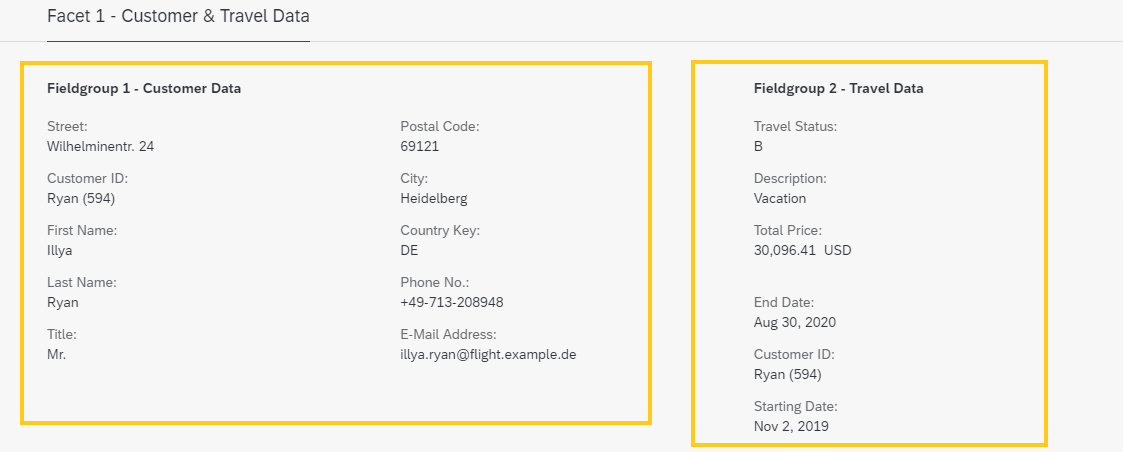
上下文和使用
可以排列要在构面中显示为组的字段。
在元素部分创建构面类型
#FIELDGROUP_REFERENCE。为该构面定义
'targetQualifier'。'targetQualifier'在定义元素时用作此构面的参考。将
UI.fieldGroup注释放在元素部分中,直接在要包含在组中的每个元素之前。使用
'qualifier'将元素分配到之前创建的构面的'targetQualifier'。
构面还可以从其他数据定义中收集字段组项目。在以下示例中,'Fieldgroup1-ID' 将项目从 _Customer 分配到差旅 CDS 视图中的父项 Facet1-ID。_Customer 元数据扩展中描述这些项目。'Fieldgroup2-ID' 将差旅 CDS 视图中的项目分配到同一父项 Facet1-ID。
您可以在 UI 参考中找到更多详细信息。
代码片段
在完整 UI 注释示例代码中查找差旅场景的元数据扩展文件。
1.TRAVEL 的元数据扩展(清单报表表的数据定义)
展开以下代码示例以查看源代码
示例代码
annotate view Z_C_TRAVEL_R with

{
...
  @UI.facet: [
...
  // Body Facets (Object Page)

       // Facet 1 - Parent (collection) for Fieldgroup 1 and Fieldgroup 2

             { id:              'Facet1-ID',
               type:            #COLLECTION,
               label:           'Facet 1 - Customer & Travel Data',
               position:        10 },

       // Facet for Fieldgroup 1 - nested inside Facet 1

             { id:              'Fieldgroup1-ID',
               type:            #FIELDGROUP_REFERENCE,
               label:           'Fieldgroup 1 - Customer Data',
               parentId:        'Facet1-ID',   // Places this facet into 'Facet 1'
               targetElement:   '_Customer',   // Specifies where the data is retrieved from - UI annotations must be defined in the respective target
               targetQualifier: 'Fieldgroup1',
               position:         10 },

       // Facet for Fieldgroup 2 - nested inside Facet 1

             { id:              'Fieldgroup2-ID',
               type:            #FIELDGROUP_REFERENCE,
               label:           'Fieldgroup 2 - Travel Data',
               parentId:        'Facet1-ID',   // Places this facet into 'Facet 1'
               targetQualifier: 'Fieldgroup2', // No targetElement defined. Default target is the entity in which the facet is defined.
               position:         20 }
             ]

// ELEMENT LIST

  // FIELDS

  @UI: { lineItem:       [ { position: 30,
                             importance: #HIGH } ],
         identification: [ { position: 30 } ],
         fieldGroup:     [ { qualifier: 'Fieldgroup2',
                             position: 10 } ] }
  CustomerID;

  @UI: { lineItem:       [ { position: 40,
                             qualifier: 'Facet2' } ],
         identification: [ { position: 40 } ] ,
         fieldGroup:     [ { qualifier: 'Fieldgroup2',
                             position: 10 } ] }
  BeginDate;

  @UI: { lineItem:       [ { position: 41,
                             importance: #MEDIUM,
                             qualifier: 'Facet2' } ],
         identification: [ { position: 41 } ],
         fieldGroup:     [ { qualifier: 'Fieldgroup2',
                             position: 10 } ] }
  EndDate;

  @UI: { identification: [ { position: 42 } ] ,
         fieldGroup:     [ { qualifier: 'Fieldgroup2',
                             position: 10 } ] }
  BookingFee;

  @UI: { identification: [ { position: 43 } ] ,
         fieldGroup:     [ { qualifier: 'Fieldgroup2',
                             position: 10 } ],
         dataPoint:       { title: 'Total Price',
                            targetValueElement: 'TotalPrice' }  }
  TotalPrice;

  @UI: { identification:[ { position: 45,
                            label: 'Comment' } ] ,
         fieldGroup:    [ { qualifier: 'Fieldgroup2',
                            position: 10 } ] }
  Memo;

  @UI: { lineItem:      [ { position: 50,
                            importance: #HIGH },
                          { type: #FOR_ACTION,
                            dataAction: 'set_status_booked',
                            label: 'Set to Booked' } ],
  fieldGroup:           [ { qualifier: 'Fieldgroup2',
                            position: 10 } ] }
  Status;
}
_Customer的元数据扩展
展开以下代码示例以查看源代码
示例代码
...
annotate view Z_C_CUSTOMER_R with

{
  @UI.fieldGroup: [{qualifier: 'Fieldgroup1', position: 05}]
  Street;

  @UI.fieldGroup: [{qualifier: 'Fieldgroup1', position: 10}]
  CustomerID;

  @UI.fieldGroup: [{qualifier: 'Fieldgroup1', position: 20}]
  FirstName;

  @UI.fieldGroup: [{qualifier: 'Fieldgroup1', position: 30}]
  LastName;

  @UI.fieldGroup: [{qualifier: 'Fieldgroup1', position: 40}]
  Title;

  @UI.fieldGroup: [{qualifier: 'Fieldgroup1', position: 50}]
  PostalCode;

  @UI.fieldGroup: [{qualifier: 'Fieldgroup1', position: 60}]
  City;

  @UI.fieldGroup: [{qualifier: 'Fieldgroup1', position: 70}]
  CountryCode;

  @UI.fieldGroup: [{qualifier: 'Fieldgroup1', position: 80}]
  PhoneNumber;

  @UI.fieldGroup: [{qualifier: 'Fieldgroup1', position: 90}]
  EMailAddress;

  /* Associations */
  //Z_UI_CUSTOMER
  @UI.fieldGroup: [{qualifier: 'Fieldgroup1', position: 100}]
  _Country;

}
来源:SAP Help Portal · 2025 FPS02 (Oct 2026) · 中文为 SAP 官方机器翻译