探索 Deployment
学习目标
说明使用 Deployment 的优势
描述 Deployment 清单
选择合适的部署策略
了解如何使用部署历史记录功能
了解如何扩缩 Deployment
介绍 Deployment 及其优势
概览
我们已经将 Deployment 介绍为 ReplicaSet 的更高层抽象。你可以使用 Deployment 以声明方式定义应用程序的期望状态。这包括副本数量、容器镜像以及更多配置。Deployment 管理 ReplicaSet,而 ReplicaSet 管理 Pod。
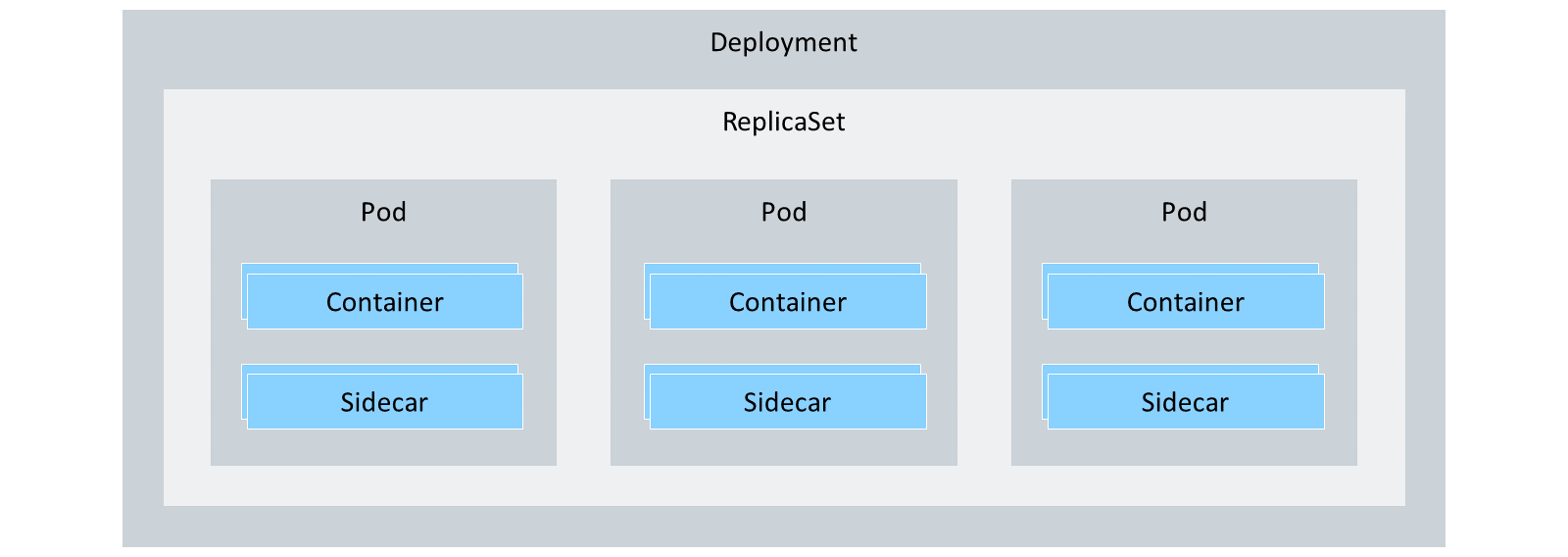
Deployment 的优势
考虑以下场景:你为版本 1.0.0 的应用程序手动创建了一个 Pod。一段时间后,你想将应用程序更新到版本 1.0.1。为此,你必须基于新镜像创建一个新 Pod,更新 Service 使其指向新 Pod,并删除旧 Pod。这是一项大量且容易出错的手动工作。
这正是 Deployment 发挥作用的地方,它可以自动完成此过程。你可以使用 Deployment 以声明方式定义应用程序新的期望状态,并可靠地推出新版本,而不会导致当前运行的应用程序出现任何停机。
点击下面的按钮,了解 Deployment 的主要优势。
Deployment 清单
由于 Deployment 管理 ReplicaSet,而 ReplicaSet 又管理 Pod,因此 Deployment 清单与 ReplicaSet 清单非常相似。不过,Deployment 清单使用 Deployment 特有的字段和对象,例如 strategy 对象。
apiVersion: apps/v1
kind: Deployment
metadata:
name: hello-kyma
spec:
replicas: 3
selector:
matchLabels:
app: hello-kyma
template: # Pod template
metadata:
labels:
app: hello-kyma
spec:
containers:
- name: hello-kyma
image: ghcr.io/sap-samples/kyma-runtime-learning-journey/hello-kyma:1.0.0
ports:
- containerPort: 8080
此示例展示了一个名为 hello-kyma 的 Deployment 清单。
该 Deployment 有三个副本,Pod 模板使用标签 app: hello-kyma。Pod 模板有一个名为 hello-kyma 的容器,其镜像 hello-kyma:1.0.0 从 GitHub Container Registry (ghcr.io) 拉取。该容器公开端口:8080。
让我们详细看一下 Deployment 清单的 spec 部分:.
详细说明 Deployment 的 spec 部分
字段 |
描述 |
必填 |
可能的值 |
|---|---|---|---|
Replicas |
应用程序的副本数量。 |
是 |
整数 |
Selector |
用于标识由 Deployment 管理的 Pod 的选择器。 |
是 |
至少是 Pod 模板中定义的标签的子集。 |
Template |
用于创建由 Deployment 管理的 Pod 的 Pod 模板。 |
是 |
Pod 标签和 Pod 清单。 |
如果你想从私有镜像仓库拉取镜像,可以在 Deployment 清单的 spec.template.spec 字段中提供凭据:
...
spec:
...
template:
...
spec:
imagePullSecrets:
- name: myregistrykey
containers:
- name: hello-kyma
image: ghcr.io/sap-samples/kyma-runtime-learning-journey/hello-kyma:1.0.0
ports:
- containerPort: 8080
关于 Pod 模板的 containers 对象,建议使用以下属性:
containers 对象中推荐的属性
字段 |
描述 |
必填 |
可能的值 |
|---|---|---|---|
Name |
容器的名称。 |
是 |
字符串 |
Image |
容器的镜像。 |
是 |
字符串 |
Resources |
容器的资源。 |
否 |
|
ImagePullPolicy |
镜像拉取策略。 |
否 |
|
Ports |
容器的端口。 |
否 |
ImagePullPolicy 默认设置为 IfNotPresent。这意味着只有当集群节点上本地不存在该镜像时才会拉取它。如果你希望始终拉取镜像,可以将 ImagePullPolicy 设置为 Always。
注意
如果你指定的镜像带有 latest 标签,并且你或系统创建了新的 Pod,Kubernetes 将始终下载最新的 latest 版本。这可能导致意外行为,因为其他 Pod 仍然可以使用旧镜像。因此,建议使用镜像的特定版本,例如,hello-kyma:1.0.0。
请参阅一个示例 Deployment 清单:
apiVersion: apps/v1
kind: Deployment
metadata:
name: hello-kyma
labels:
app.kubernetes.io/name: hello-kyma
spec:
replicas: 3
selector:
matchLabels:
app: hello-kyma
template:
metadata:
labels:
app: hello-kyma
spec:
imagePullSecrets: [ ]
containers:
- name: hello-kyma
image: 'ghcr.io/sap-samples/kyma-runtime-learning-journey/hello-kyma:1.0.0'
resources:
requests:
memory: 64Mi # 64MiB (2^26 bytes)
cpu: 50m # 50 millicores (1/20th of a core), 500m = 0.5 cores
limits:
memory: 128Mi
cpu: 100m # 100 millicores (1/10th of a core), 1000m = 1 core
ports:
- containerPort: 8080
关于所有其他字段,请参阅 Kubernetes Deployment 文档。
高级部署策略
Kubernetes 支持以下两种部署策略:
支持的部署策略
策略 |
说明 |
备注 |
|---|---|---|
Rolling Update |
默认策略。应用程序的新版本以滚动方式推出。在推出过程中,新的 Pod 会逐步替换旧的 Pod。Kubernetes 会等待新 Pod 启动后再移除旧 Pod。 |
当你希望在不中断服务的情况下更新应用程序时。 |
Recreate |
应用程序的新版本通过先删除当前版本的所有 Pod,然后再创建新版本的 Pod 来推出。 |
当你希望或可以容忍停机来更新应用程序时。 |
你可以在 Deployment 清单中指定部署策略:
apiVersion: apps/v1
kind: Deployment
metadata:
name: hello-kyma
spec:
replicas: 3
selector:
matchLabels:
app: hello-kyma
template:
metadata:
labels:
app: hello-kyma
spec:
containers:
- name: hello-kyma
image: ghcr.io/sap-samples/kyma-runtime-learning-journey/hello-kyma:1.0.0
ports:
- containerPort: 8080
strategy:
type: RollingUpdate
rollingUpdate:
maxSurge: 25%
maxUnavailable: 25%
对于 strategy.type 字段,你可以指定 RollingUpdate 或 Recreate。由于 RollingUpdate 是默认且推荐的策略,因此它是本课的重点。
如前所述,RollingUpdate 策略不会在创建新 Pod 之前删除旧 Pod。相反,它以滚动方式执行更新。你可以精确定义可以同时更新的 Pod 百分比。为此,请使用 maxSurge 和 maxUnavailable 字段:
maxSurge 字段定义了可以在期望 Pod 数量之上创建的最大 Pod 数量。
maxUnavailable 字段定义了在更新期间可以处于不可用状态的最大 Pod 数量。
两个字段的默认值都是 25%。因此,在你已经创建新 Pod 并提供服务的同时,旧 Pod 仍然可以接收流量。
注意
在同一服务背后同时提供两个版本的应用程序也会带来一些挑战。例如,你必须确保应用程序的新版本与旧版本兼容。这一要求被称为 API 兼容性。强烈建议为你的 API 制定版本管理方案,使其同时具备向前和向后兼容性。
Deployment 历史记录
每个 Deployment 还包含完整的部署历史记录。如果出现问题,这允许你回滚到应用程序的先前版本。
你可以使用 kubectl 检查 Deployment 的部署历史记录:
kubectl rollout history deployment hello-kyma
要回滚到应用程序的先前版本,可以使用 kubectl rollout undo 命令:
kubectl rollout undo deployment hello-kyma
扩缩 Deployment
你只需更新 Deployment 清单中的 replicas 字段即可扩缩 Deployment。同样,你也可以使用 kubectl 来扩缩 Deployment:
kubectl scale deployment hello-kyma --replicas=5
运行该命令会更新底层 ReplicaSet 并创建两个新 Pod。你可以使用以下命令进行验证:
kubectl get deployments hello-kyma
输出如下所示:

总结
Kubernetes 中的 Deployment 是 Pod 和 ReplicaSet 的高层抽象,允许你以声明方式定义应用程序的期望状态。Deployment 自动化了更新和回滚等过程,减少了手动工作和潜在错误。它们支持两种主要的部署策略:用于零停机更新的 Rolling Update,以及用于可容忍停机的更新的 Recreate。此外,Deployment 会保留变更历史记录,使你可以在需要时轻松回滚到先前版本,并且可以通过调整副本数量无缝扩缩。