通过多模态输入提升提示词效果
学习目标
通过在提示词中利用多模态输入来优化 AI 响应。
我们已经掌握了精炼基于文本的提示词以获取结构化信息的技巧。但是,如果一张图片能让您的 LLM 的工作轻松许多呢?在现实世界中,问题往往带有视觉线索。本课将向您展示如何通过使用多模态输入(即同时包含文本和图像)为您的 LLM 提供这种视觉上下文。我们将探讨如何直接在 SAP AI Launchpad 中实现,以及如何通过使用 SAP Cloud SDK for AI 扩展我们的代码来实现,从而获得更智能、更准确的 AI 解决方案。
为什么多模态输入很重要
想象一位客户报告机器损坏。他们可以用文字描述,但如果同时附上损坏部件的照片,问题就会清晰得多。通过允许您的提示词同时接受文本和图像,您就为 LLM 提供了完整的画面,这可以带来:
更好的理解: LLM 能够"看到"您的意思,减少混淆。
更准确的结果: 视觉信息有助于确认细节或揭示仅凭文字可能遗漏的问题。
解决新问题: 这为 AI 帮助处理需要视觉和文本分析的任务(例如质量检查或维护)开辟了可能性。
generative AI hub 配合 SAP AI Launchpad 和 SAP Cloud SDK for AI,使这一强大的能力变得易于使用。
SAP Launchpad 中的多模态提示词
您并不总是需要编写代码才能使用多模态提示词。SAP AI Launchpad 提供了一个友好的用户界面,您可以在其中轻松地组合文本和图像。它支持许多多模态模型,例如 GPT-4o,让您能够以可视化方式创建和测试这些高级提示词。
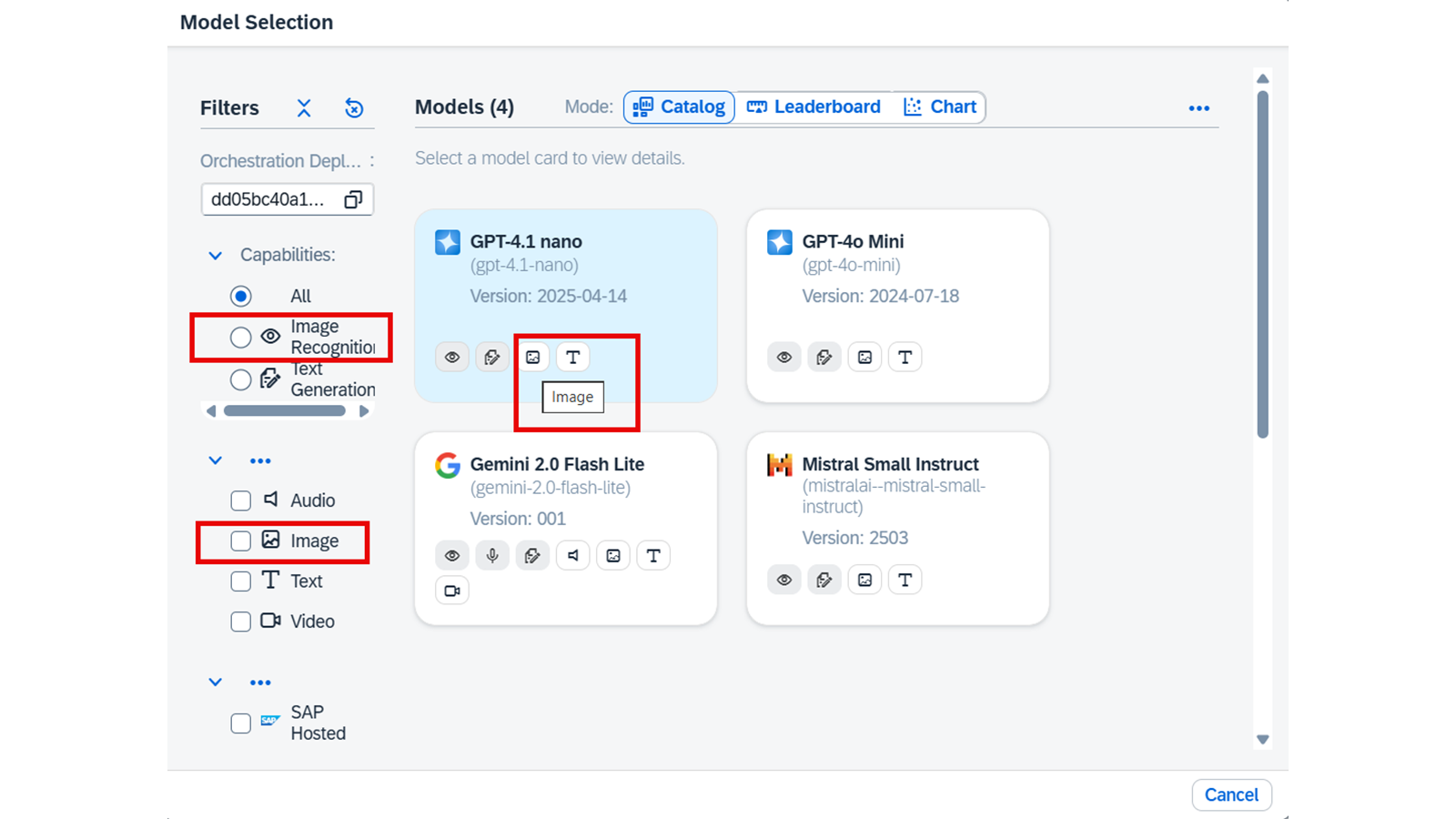
要查看哪些模型支持多模态模式,请参阅 Model Library 和模型卡。
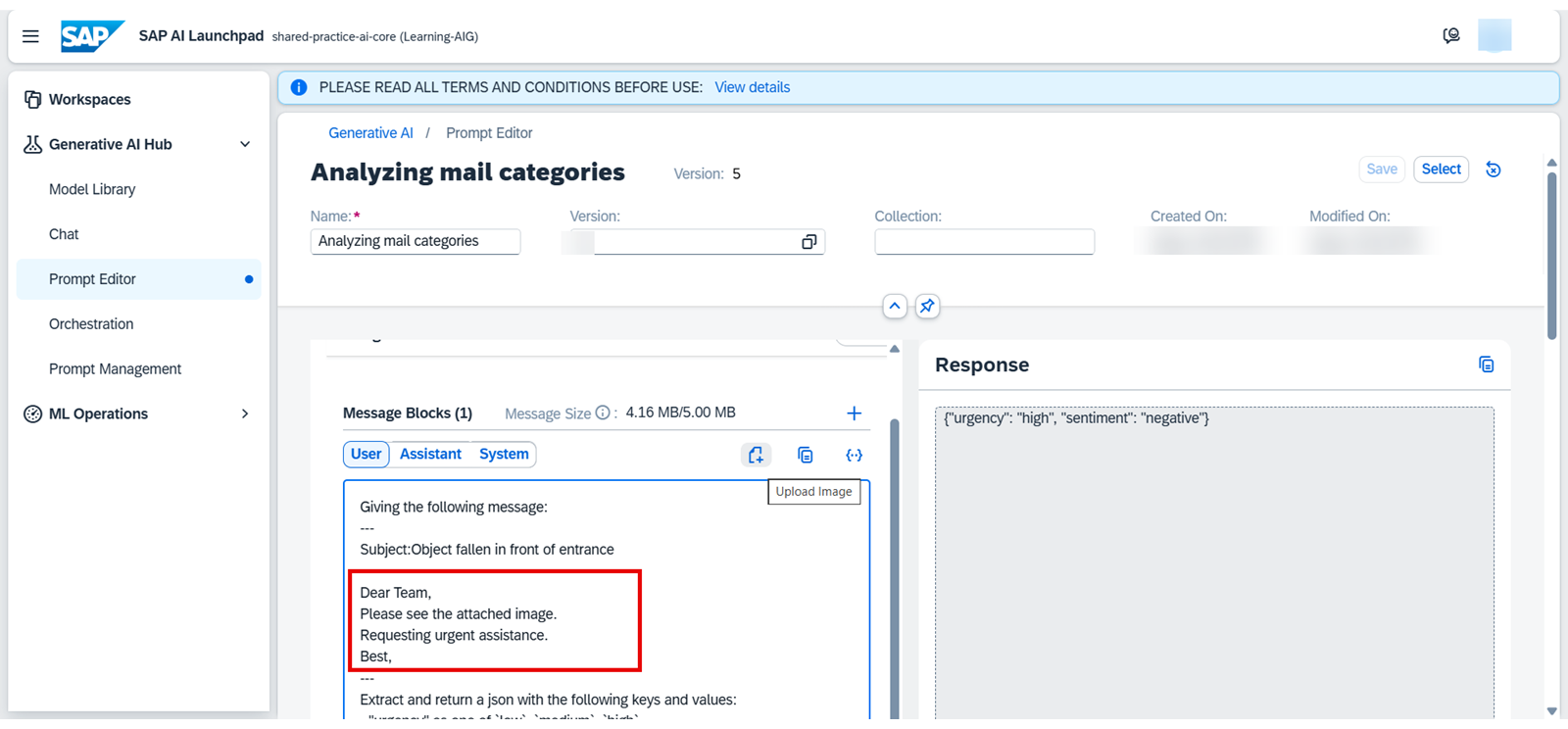
让我们看看这在 Prompt Editor 中的呈现方式:
在 Prompt Editor 中,您输入了一封示例电子邮件以及指示 LLM 提取包含紧急程度和情绪的 JSON 输出的指令。您会注意到一个 "Upload Image" 按钮。这就是您可以为提示词添加视觉组件的地方。
对于这种纯文本输入,AI 的响应可能是:{"urgency": "high", "sentiment": "neutral"}。
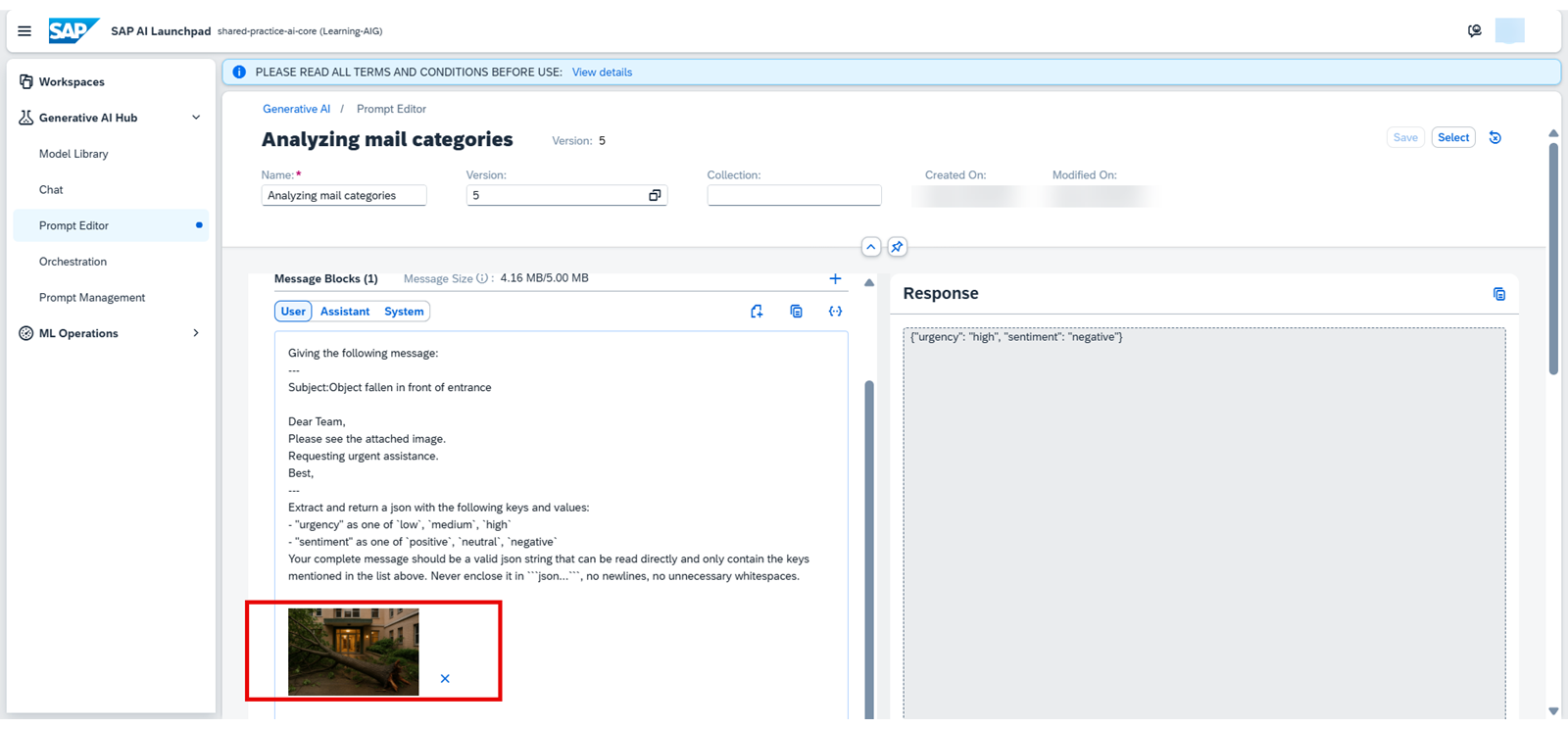
在这里,点击 "Upload Image"(或拖放)之后,一张小的嵌入式图像现在直接显示在输入文本区域内。这张显示入口处有一棵倒下的树的图片,现在成为了提示词的一部分。
现在,响应将类似于:{"urgency": "high", "sentiment": "negative"}
您可以看到,投诉文本非常短,但有了这些额外的视觉信息,AI 往往能够给出更精确的响应。
使用 SAP Cloud SDK for AI 的多模态提示词
对于以编程方式访问并将多模态能力集成到您的自定义应用中,您可以使用 SAP Cloud SDK for AI。主要的变化在于我们如何定义发送给 LLM 的用户消息。UserMessage 现在不再只是一个文本字符串,而是可以接受一个内容部分列表,其中每个部分可以是文本或图像 URL。
以下是我们如何调整 send_request 函数和提示词(prompt_13_multimodal)以包含图像:
# We need to import TextContent and ImageUrlContent for multimodal messages
from gen_ai_hub.orchestration.models.message import SystemMessage, UserMessage, TextContent, ImageUrlContent
from gen_ai_hub.orchestration.models.template import Template, TemplateValue
from gen_ai_hub.orchestration.service import OrchestrationService
from functools import partial # Imported for consistency with prior lesson code

# The send_request function is updated to accept an optional 'image_url'
def send_request(prompt: str, _print: bool = True, _model: str = 'meta--llama3-70b-instruct', image_url: Optional[str] = None, **kwargs):
# We create a list to hold all parts of our message (text and optional image)
content_parts = []

# If an image URL is provided, we add it as an ImageUrlContent part
if image_url:
content_parts.append(ImageUrlContent(url=image_url))

# We always add the text prompt as a TextContent part
content_parts.append(TextContent(text=prompt))

# Now, our OrchestrationConfig uses a UserMessage with this list of content_parts
config = OrchestrationConfig(
llm=LLM(name=_model),
template=Template(messages=[UserMessage(content=content_parts)]) # Key change here!
)
template_values = [TemplateValue(name=key, value=value) for key, value in kwargs.items()]
answer = orchestration_service.run(config=config, template_values=template_values)
result = answer.module_results.llm.choices[0].message.content
if _print:
print(f"<-- PROMPT TEXT --->\n{prompt}")
if image_url:
print(f"<-- IMAGE URL --->\n{image_url}")
print(f"<--- RESPONSE --->\n{result}")
return result

# --- Updated Multimodal Prompt (prompt_13_multimodal) ---
prompt_13_multimodal = """Your task is to classify messages and the provided image.
Here are some examples:
---
{{?few_shot_examples}}
---
This is an explanation of `urgency` labels:
---
{{?guide_urgency}}
---
This is an explanation of `sentiment` labels:
---
{{?guide_sentiment}}
---
This is an explanation of `support` categories:
---
{{?guide_categories}}
---
Giving the following message and considering the image for visual context:
---
{{?input}}
---
extract and return a JSON with the following keys and values:
- "urgency" as one of {{?urgency}}
- "sentiment" as one of {{?sentiment}}
- "categories" list of the best matching support category tags from: {{?categories}}
Your complete message should be a valid json string that can be read directly and only contain the keys mentioned in the list above. Never enclose it in ```json...```, no newlines, no unnecessary whitespaces.
"""

# --- Example Usage (requires 'option_lists', 'examples', 'guides', 'mail' to be defined from prior lessons) ---
# For illustration purposes, let's assume these are set up:
# option_lists = { "urgency": ["low", "medium", "high"], ... }
# examples = "..." # Formatted few-shot examples
# guides = { "guide_urgency": "...", ... }
# mail = {"message": "The HVAC system is making a loud banging noise and no longer cooling. It needs immediate attention."}

# This URL should point to a real image accessible by the LLM
example_image_url = "https://example.com/assets/faulty_hvac_part.png" # Replace with a real image URL

# We create our partial function, now including the image_url
f_13_multimodal = partial(
send_request,
prompt=prompt_13_multimodal,
# Pass all our usual options, few-shot examples, and guides
**option_lists,
few_shot_examples=examples,
**guides,
image_url=example_image_url # This is the crucial addition!
)

# When you call this function, the LLM receives both text and the image
# response_multimodal = f_13_multimodal(input=mail["message"])
# print("\nReceived Multimodal Response:", response_multimodal)
理解代码变更
新增导入: 我们现在从 gen_ai_hub.orchestration.models.message 导入 TextContent 和 ImageUrlContent。这些特殊类型告诉 SDK 我们正在发送不同种类的内容。
send_request 更新:
它现在接受一个可选的 image_url 参数。
在函数内部,我们创建了一个名为 content_parts 的列表。
如果提供了 image_url,我们就使用 ImageUrlContent(url=image_url) 将其添加到 content_parts 中。
原始文本提示词也使用 TextContent(text=prompt) 添加到 content_parts 中。
我们 OrchestrationConfig 中的 UserMessage 现在接收这个 content_parts 列表。这告诉 SDK 将图像和文本一起发送给 LLM。
prompt_13_multimodal: 提示词本身的文本略有更新,以明确告诉 LLM"对消息和所提供的图像进行分类",并考虑"图像作为视觉上下文"。这有助于引导 LLM 的注意力。
调用该函数: 当我们使用 partial 创建 f_13_multimodal 时,我们只需将 image_url=example_image_url 作为一个参数包含进去。现在,每次调用 f_13_multimodal 时,它都会将来自 mail["message"] 的文本连同 example_image_url 处的图像一起发送给 LLM。
评估多模态响应
与纯文本提示词一样,评估多模态响应也至关重要。您将使用与之前相同的评估函数来检查 JSON 输出格式是否正确,以及提取出的类别、情绪和紧急程度是否准确。关键区别在于,现在 LLM 有更多信息(图像)来得出答案,因此您判断何为正确的"基准真相"隐式地包含了该视觉上下文。这有助于您确认添加图像确实提升了 AI 的理解能力和准确性。
实际应用
generative AI hub 这一多模态能力的一个实际应用,是能够通过文本、音频、图像和视频与用户交互的、基于 Web 的智能聊天机器人。它使用多模态 AI 模型返回具备上下文感知的响应。
本课总结
在本课中,您向前迈出了重要一步,学会了将多模态输入融入到您的生成式 AI 应用中。无论是使用直观的 SAP AI Launchpad,还是以编程方式使用 SAP Cloud SDK for AI,您现在都理解了如何为 LLM 提供文本和图像上下文。这种强大的方法能够带来更智能、更精确、上下文更丰富的响应,扩展了您可以在 SAP 生态系统中有效解决的实际业务问题的范围。
本课其余配图
本课其余配图
本课其余配图
本课其余配图