使用 APIRule 在 Kyma 中公开服务
学习目标
创建 APIRule 以公开和保护服务
使用场景
你已将应用部署到 Kubernetes 集群并为其创建了 Service。要将此 Service 公开给外部世界,你必须创建一个 APIRule。
任务流程
在本练习中,你将执行以下任务:
使用 APIRule 公开一个 Service。
测试已公开的 Service。
前提条件
在开始之前,请确保满足以下前提条件:
你已在 SAP BTP 子账户中创建了 SAP BTP, Kyma runtime 实例。参见 Deploying a Kubernetes Cluster with Kyma on SAP BTP 。
你已配置 kubectl 以与你的 SAP BTP, Kyma runtime 实例交互,并且你可以访问 Kyma dashboard。参见 Setting and Configuring Kubectl for Kyma 和 Accessing Your Kyma Runtime Instance Using Kyma Dashboard 。
你已在练习 Creating and Managing a Deployment 中成功创建了 hello-kyma Deployment。
你已在练习 Creating a Service for a Deployment 中成功创建了 hello-kyma-svc Service。
任务 1:使用 APIRule 自定义资源公开 Service
步骤
创建一个名为
hello-kyma-api-rule.yaml的文件,内容如下:
apiVersion: gateway.kyma-project.io/v2
kind: APIRule
metadata:
name: hello-kyma
spec:
hosts:
- hello-kyma.<hostname> # replace <hostname> with your Kyma hostname
service:
name: hello-kyma-svc
port: 80
gateway: kyma-system/kyma-gateway
rules:
- path: /*
methods: ["GET"]
noAuth: true
从你的 SAP BTP, Kyma runtime 中获取主机名,并调整 APIRule 清单中的 host。
kubectl get gateway kyma-gateway -n kyma-system -o=jsonpath='{.spec.servers[0].hosts[0]}'
注意
请注意,此命令返回的是通配符主机名。
将 APIRule 清单应用到集群。
kubectl apply -f hello-kyma-api-rule.yaml
在浏览器中访问该应用。
打开 Web 浏览器。
导航到 URL
http://hello-kyma.<hostname>(替换为你的 Kyma 主机名)。你应该会看到来自
hello-kyma应用的问候语。
任务 2:在 Kyma Dashboard 中查看 APIRule
步骤
转到 Kyma dashboard 的 APIRules 部分。
在 Web 浏览器中打开 Kyma dashboard。你可以在子账户的 Kyma Environment 部分找到该链接。
选择 API Rules,然后选择
hello-kymaAPIRule。验证详细信息,复制主机链接,并将该链接粘贴到你的浏览器中。
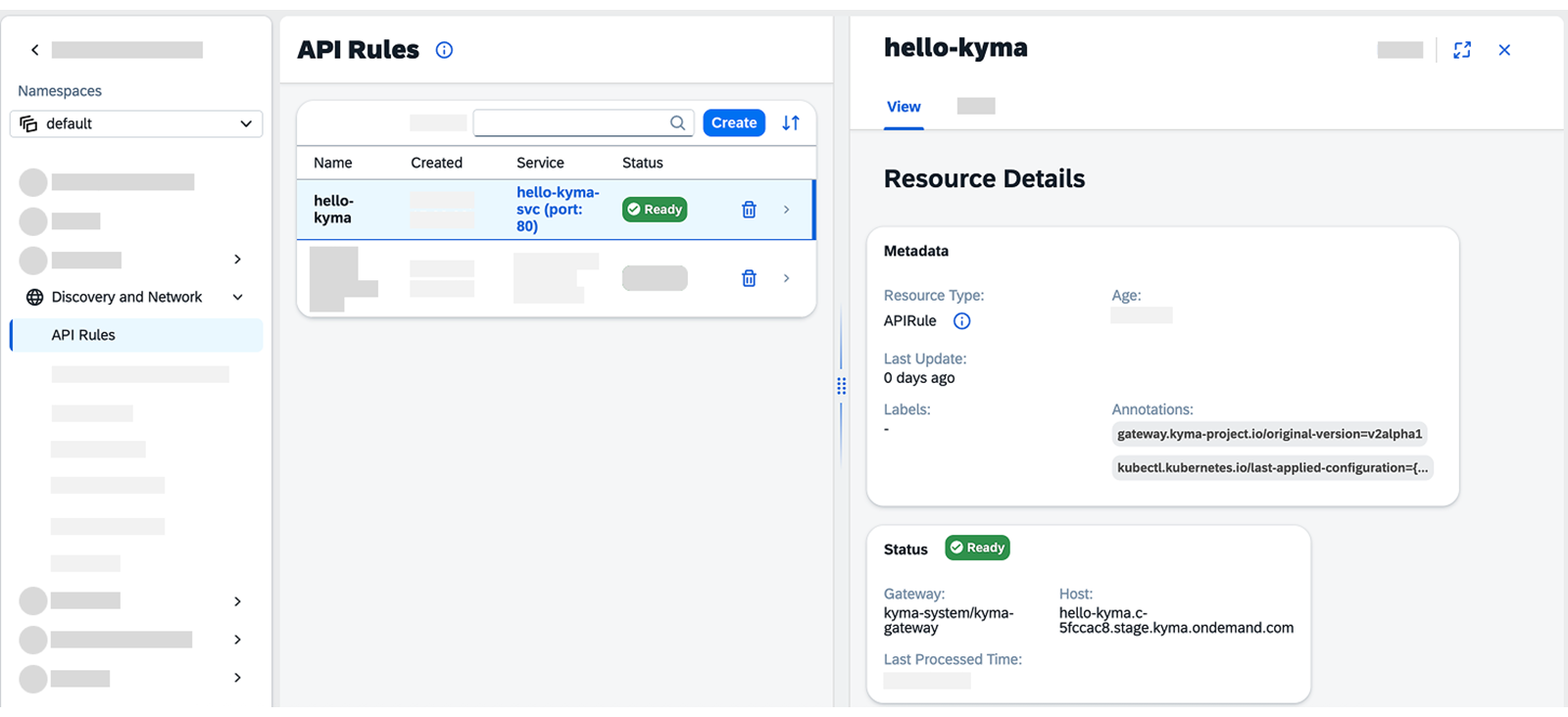
如果成功,浏览器将显示来自你的
hello-kyma应用的问候语。
结果
你已成功使用 APIRule 公开了你的服务。