实施提示工程技巧
学习目标
设计一套系统化方法,从简单基线出发来开发和评估提示工程。
在本课中,你将了解如何通过高级提示工程技巧提升 LLM 响应的智能性和精确度。在之前建立的基线评估基础上,你将学习使用 SAP Cloud SDK for AI 实施 Few-shot Prompting 和 Meta-prompting 等强大策略,并观察它们对提升生成式 AI 应用程序质量和准确度的影响。
Few-Shot Prompting
让我们实施提示技巧,然后评估结果,看看提示结果是否有所改进。
我们使用以下代码:
prompt_10 = Template(
messages=[
SystemMessage(
"""You are an intelligent assistant. Your task is to extract and categorize messages. Here are some example:
{{?few_shot_examples}}
Use the examples when extract and categorize the following message:
Extract and return a json with the follwoing keys and values:
- "urgency" as one of {{?urgency}}
- "sentiment" as one of {{?sentiment}}
- "categories" list of the best matching support category tags from: {{?categories}}
Your complete message should be a valid json string that can be read directly and only contain the keys mentioned in the list above. Never enclose it in ```json...```, no newlines, no unnessacary whitespaces."""),
UserMessage("{{?input}}")
]
)

import random
random.seed(42)

k = 3
examples = random.sample(dev_set, k)

example_template = """<example>
{example_input}

## Output

{example_output}
</example>"""

examples = '\n---\n'.join([example_template.format(example_input=example["message"], example_output=json.dumps(example["ground_truth"])) for example in examples])

f_10 = partial(send_request, prompt=prompt_10, few_shot_examples=examples, **option_lists)

response = f_10(input=mail["message"])
overall_result["few_shot--llama3.1-70b"] = evalulation_full_dataset(test_set_small, f_10)
pretty_print_table(overall_result)
该代码旨在创建一个提示模板,用于根据消息的紧急程度、情感和支持类别标签来提取和分类消息。通过使用从开发集中随机选取的示例,它生成一个格式化的 few-shot 学习提示。该提示被发送到语言模型以处理并分类给定的输入消息,随后模型的整体表现会被评估并以表格形式显示。
以下是代码中若干部分的详细说明:
设置随机种子 :它使用 "random.seed(42)" 设置随机种子,以确保示例的随机抽样可复现。这有助于保持实验和评估的一致性。
抽样示例 :变量 "k" 设置为 3,表示从 "dev_set" 数据集中抽样的示例数量。"random.sample(dev_set, k)" 函数从开发集中随机选取三个示例。
格式化示例 :选定的示例会被格式化为模板 "example_template"。每个示例都包含输入消息以及 JSON 格式的预期输出。随后使用 "\n---\n" 连接这些格式化字符串,形成一组连贯的示例。
偏函数应用 :"partial" 函数用于将生成的提示和示例绑定到 "send_request" 函数,从而创建一个只需传入输入消息即可调用的函数 "f_10"。这样便简化了向模型发送带有必要上下文的请求的过程。
发送请求并评估 :脚本使用 "f_10(input=mail["message"])" 以及来自 "mail["message"]" 的输入消息发送请求。结果被存储并针对小型测试数据集 "test_set_small" 进行评估。评估结果存储在 "overall_result["few_shot--llama3-70b"]" 中。
输出显示 :最后,使用 "pretty_print_table(overall_result)" 函数以格式化表格显示评估结果,使结果更易于解读。
响应示例:
0%|          | 0/20 [00:00<?, ?it/s]
is_valid_json correct_categories correct_sentiment correct_urgency
=========================================================================================
basic--llama3.1-70b        100.0%              83.5%             30.0%           70.0%
few_shot--llama3.1-70b        100.0%              84.0%             50.0%           90.0%
这是实施 few-shot prompting 后的评估输出。
你可以看到在情感和紧急程度分配方面的改进。
我们此前建立了基线,现在可以使用测试数据评估并比较优化后的提示与基线的结果。
Meta-prompting
这里我们将实施 meta-prompting,为紧急程度、情感等各类标签创建详细的提示指南。
我们使用以下代码:
example_template_metaprompt = """<example>
{example_input}

## Output
{key}={example_output}
</example>"""

prompt_get_guide = Template(
messages=[
SystemMessage(
"""Here are some example:
---
{{?examples}}
---
Use the examples above to come up with a guide on how to distinguish between {{?options}} {{?key}}.
Use the following format:
```

## **<category 1>**
- <instruction 1>
- <instruction 2>
- <instruction 3>

## **<category 2>**
- <instruction 1>
- <instruction 2>
- <instruction 3>
...
```
When creating the guide:
- make it step-by-step instructions
- Consider than some labels in the examples might be in correct
- Avoid including explicit information from the examples in the guide
The guide has to cover: {{?options}}
"""
),
UserMessage("{{?input}}")
]
)

guides = {}

for i, key in enumerate(["categories", "urgency", "sentiment"]):
options = option_lists[key]
selected_examples_txt_metaprompt = '\n---\n'.join([example_template_metaprompt.format(example_input=example["message"], key=key, example_output=example["ground_truth"][key]) for example in dev_set])
guides[f"guide_{key}"] = send_request(prompt=prompt_get_guide, examples=selected_examples_txt_metaprompt,input=selected_examples_txt_metaprompt, key=key, options=options, _print=False, _model='gpt-4o')
print(guides['guide_urgency'])
该代码根据数据集中的带标签示例,为 "categories"、"urgency" 和 "sentiment" 等不同类别生成分步指南。
它为区分文本数据中的类别、紧急程度和情感创建了量身定制的指南。它使用特定模板格式化示例,然后将这些示例发送到模型以生成分步指令。这些指南帮助用户根据所提供示例中的模式来区分这些类别。
详细说明:
模板定义:
"example_template_metaprompt":定义用于格式化示例的模板,规定如何在示例中组织输入和输出。
"prompt_get_guide":勾勒出请求基于格式化示例生成指南的提示格式。它还规定了指南的格式和要求,包括使其成为分步指令、考虑可能不正确的标签,以及避免直接照搬示例。
指南准备:
脚本遍历三个键:"categories"、"urgency" 和 "sentiment"。
对于每个键,它从 "option_lists" 中获取相关选项。
示例选择与格式化:它使用为每个键预定义的模板格式化来自 "dev_set" 的示例,并嵌入输入消息和相应的基准真值(ground truth)。
指南生成:
它将格式化后的提示连同示例发送到模型(gpt-4o),请求为每个键生成用于区分指定选项的指南。
它将生成的指南存储在字典(guides)中,每个指南与其对应的键关联(例如 "guide_categories"、"guide_urgency"、"guide_sentiment")。
此过程确保为不同的分类任务生成全面且准确的指令指南,有助于正确地分类文本数据。
代码的最后一行打印紧急程度的指南。
你将看到该指南描述了可在提示中使用的各个紧急程度类别的规则。
我们使用以下代码在提示中利用这些指南。
prompt_12 = Template(
messages=[
SystemMessage(
"""You are an intelligent assistant. Your task is to classify messages.
This is an explanation of `urgency` labels:
---
{{?guide_urgency}}
---
This is an explanation of `sentiment` labels:
---
{{?guide_sentiment}}
---
This is an explanation of `support` categories:
---
{{?guide_categories}}
---
Giving the following message:

Extract and return a json with the following keys and values:
- "urgency" as one of {{?urgency}}
- "sentiment" as one of {{?sentiment}}
- "categories" list of the best matching support category tags from: {{?categories}}
Your complete message should be a valid json string that can be read directly and only contain the keys mentioned in the list above. Never enclose it in ```json...```, no newlines, no unnessacary whitespaces.
"""
),
UserMessage("{{?input}}")
]
)
f_12 = partial(send_request, prompt=prompt_12, **option_lists, **guides)
response = f_12(input=mail["message"])
该代码通过利用由 meta-prompt 代码生成的预定义指南,更新了提示中用于根据紧急程度、情感和支持类别对消息进行分类的系统角色。然后它使用偏函数将该提示作为请求发送,并附带特定的选项和指南。最后,它处理一封电子邮件消息,以 JSON 格式提取并返回这些分类结果。
使用以下代码评估此提示及其响应:
overall_result["metaprompting--llama3.1-70b"] = evalulation_full_dataset(test_set_small, f_12)
pretty_print_table(overall_result)
你可以得到以下输出:
0%|          | 0/20 [00:00<?, ?it/s]
is_valid_json correct_categories correct_sentiment correct_urgency
==============================================================================================
basic--llama3.1-70b        100.0%              83.5%             30.0%           70.0%
few_shot--llama3.1-70b        100.0%              84.0%             50.0%           90.0%
metaprompting--llama3.1-70b        100.0%              90.0%             30.0%           95.0%
现在,我们看到紧急程度和类别的准确率有所提高,但情感的准确率却下降了。
结合 Meta-prompting 与 Few-shot Prompting
我们可以使用以下代码结合 meta-prompting 和 few-shot prompting:
prompt_13 = Template(
messages=[
SystemMessage(
"""You are an intelligent assistant. Your task is to classify messages.
Here are some examples:
---
{{?few_shot_examples}}
---
This is an explanation of `urgency` labels:
---
{{?guide_urgency}}
---
This is an explanation of `sentiment` labels:
---
{{?guide_sentiment}}
---
This is an explanation of `support` categories:
---
{{?guide_categories}}
---
Giving the following message:

extract and return a json with the follwoing keys and values:
- "urgency" as one of {{?urgency}}
- "sentiment" as one of {{?sentiment}}
- "categories" list of the best matching support category tags from: {{?categories}}
Your complete message should be a valid json string that can be read directly and only contain the keys mentioned in the list above. Never enclose it in ```json...```, no newlines, no unnessacary whitespaces.
"""
),
UserMessage("{{?input}}")
]
)

f_13 = partial(send_request, prompt=prompt_13, **option_lists, few_shot_examples=examples, **guides)

response = f_13(input=mail["message"])
该代码定义了一个用于智能助手根据紧急程度、情感和支持类别对消息进行分类的模板。它使用偏函数应用,以特定的示例和指南来定制请求处理,然后处理输入消息以返回结构化的 JSON 响应。这有助于实现准确而高效的消息分类。
它将少量示例与 meta-prompting 期间生成的指南结合在一起。
使用以下代码评估此提示及其响应:
overall_result["metaprompting_and_few_shot--llama3.1-70b"] = evalulation_full_dataset(test_set_small, f_13)
pretty_print_table(overall_result)
你将收到以下输出:
0%|          | 0/20 [00:00<?, ?it/s]
is_valid_json correct_categories correct_sentiment correct_urgency
===========================================================================================================
basic--llama3.1-70b        100.0%              83.5%             30.0%           70.0%
few_shot--llama3.1-70b        100.0%              84.0%             50.0%           90.0%
metaprompting--llama3.1-70b        100.0%              90.0%             30.0%           95.0%
metaprompting_and_few_shot--llama3.1-70b        100.0%              88.5%             50.0%           90.0%
现在,我们看到几乎所有类别的准确率都持平或有所下降。此外,它是一个更昂贵的提示,需要更多资源。
注意
你得到的响应可能与这里显示的稍有不同,本学习之旅中展示的模型其余所有响应也是如此。
当你在自己的机器上执行同一个提示时,由于 LLM 的概率特性、temperature 设置以及非确定性架构,即使设置发生细微变化或内部状态发生偏移,它也会产生不同的输出,导致响应不同。
评估总结
我们需要综合考虑模型的整体准确率和质量,以及其成本和规模。
有时,更小的模型和更简单的技巧可能会给出更好的结果。
在上面的输出中,我们可以看到 few-shot 以更低成本的提示给出了最佳表现。
让我们回顾一下到目前为止为解决业务问题所做的工作:
我们使用开源模型在 SAP AI Launchpad 中创建了一个基本提示。
我们使用 SAP Cloud SDK for AI(Python)重新创建了该提示,以扩展解决方案。
我们为这个简单提示创建了基线评估方法。
最后,我们使用了 few shot 和 meta-prompting 等技巧来进一步增强提示。
结果表明,实施高级技巧后提示响应的质量有所提高。
本课小结
你已成功实施并评估了关键的提示工程技巧:Few-shot Prompting 用于向 LLM 提供富含上下文的示例,Meta-prompting 用于生成明确的指令和指南以实现一致的行为。你还探索了将这些方法结合使用。通过迭代评估,你见证了这些技巧与 SAP Cloud SDK for AI 配合使用时,如何显著提升 LLM 响应的准确率和质量,使你的解决方案更接近可用于业务的应用程序,同时也理解了在复杂度和成本方面的权衡。
练习
在练习中,你将学习通过在 SAP AI Launchpad 的提示模板中实施 few-shot learning 等高级技巧,显著提升提示的有效性和上下文理解能力。
最后,你将了解如何通过将优化后的提示模板与编排服务集成,在 SAP AI Launchpad 的工作流中实现数据隐私和内容过滤,从而构建安全可靠的 AI 应用程序。
延续前面讨论的场景,我们创建了为客户的客户消息分配紧急程度、情感和类别的基本提示,这些提示可在软件中使用。
然而,你发现响应有时仍缺乏适当的上下文。你需要优化提示以获得更好的结果。
你可以使用 one-shot 和 few-shot prompting 等技巧来优化提示。
One-shot prompting 是最直接的技巧。它涉及一次性向 LLM 提供单条直接指令以及所有必要的上下文。
Few-shot prompting 是一种强大得多的技巧,它涉及在提示本身中向 LLM 提供若干(通常为 1 到 5 个)输入-输出对示例。这些示例展示了期望的任务、格式和行为,使 LLM 能够在执行实际请求之前学习该模式。
任务 1:使用提示模板实施 Few-Shot Prompting
我们将使用 few-shot 技巧更新你之前创建的提示模板。
步骤
确保你已登录 generative AI hub。
选择 Prompt Management,然后选择 Templates。
选择 All 按钮。你可以在这里看到你的模板。你也可以搜索你的模板。
选择该模板的最新版本,即 **3.0.0。**确保你选择的是自己的模板以及其中正确的时间戳。一个好做法是在使用模板前先阅读它。
选择该提示模板,然后点击 Open in Prompt Editor 按钮。你的提示已可使用。
在 User 角色中使用以下提示:
"<Instructions>
Analyze the provided customer email and extract the following details into a JSON object.
Ensure all fields are present and correctly typed according to the specifications in <OutputFormat>.
Summarize 'Problem_Description' concisely (max 100 words).
If any field's value cannot be determined from the email, use 'Unknown' or 'N/A' as appropriate.
</Instructions>
<OutputFormat>
{
"Complaint_ID": "string (e.g., AUTO-GEN-001)",
"Complaint_Type": "enum (Plumbing, HVAC, Electrical, Noise, Cleaning, Pest Control, General Maintenance, Other)",
"Urgency": "enum (High, Medium, Low)",
"Problem_Description": "string (concise summary, max 100 words)",
"Affected_Location": "string (e.g., Apartment 301, Main Lobby)",
"Customer_Sentiment": "enum (Very Negative, Negative, Neutral, Positive)",
"Suggested_Initial_Action": "string (clear next step for agent)"
}
</OutputFormat>
<ExampleInput>
Subject: Urgent - Leaky Faucet in Kitchen, Apartment 301
Dear Facility Management,
I am writing to report a serious issue in my apartment, 301. The kitchen faucet has been leaking non-stop since last night. It's not just a drip, it's a steady stream, and I'm worried about water damage. I tried to tighten it myself but it didn't help. This is incredibly frustrating, especially since I just moved in last month. Please send someone to fix it immediately.
Thank you,
Sarah Jenkins
</ExampleInput>
<ExampleOutput>
{
"Complaint_ID": "AUTO-GEN-001",
"Complaint_Type": "Plumbing",
"Urgency": "High",
"Problem_Description": "Kitchen faucet in Apartment 301 is leaking continuously since last night, causing concern for water damage. Tenant attempted to fix without success.",
"Affected_Location": "Apartment 301",
"Customer_Sentiment": "Very Negative",
"Suggested_Initial_Action": "Dispatch plumber to Apartment 301 with leaking faucet repair kit immediately."
}
</ExampleOutput>
<ExampleInput>
Subject: AC not working properly in Main Lobby
Dear ProCare Support,
The air conditioning in the main lobby has not been cooling effectively for the past few days. It's making the waiting area very uncomfortable for visitors and staff, especially with the weather getting warmer. It's not completely broken, but definitely struggling. Could someone please take a look at it soon? Thanks.
Regards,
Building Manager
</ExampleInput>
<ExampleOutput>
{
"Complaint_ID": "AUTO-GEN-002",
"Complaint_Type": "HVAC",
"Urgency": "Medium",
"Problem_Description": "Air conditioning in the main lobby is not cooling effectively, causing discomfort for visitors and staff. The unit is struggling but not completely non-functional.",
"Affected_Location": "Main Lobby",
"Customer_Sentiment": "Negative",
"Suggested_Initial_Action": "Schedule HVAC technician to inspect main lobby AC unit within 24-48 hours."
}
</ExampleOutput>
<ExampleInput>
Subject: Light bulb replacement - Hallway 3rd Floor
Hi Team,
Just a quick note that a light bulb in the hallway on the 3rd floor, near apartment 305, seems to have burned out. It's not a critical issue, but it would be great if someone could replace it when convenient. No rush.
Thanks,
Resident
</ExampleInput>
<ExampleOutput>
{
"Complaint_ID": "AUTO-GEN-003",
"Complaint_Type": "General Maintenance",
"Urgency": "Low",
"Problem_Description": "A light bulb in the 3rd floor hallway, near apartment 305, has burned out and needs replacement.",
"Affected_Location": "3rd Floor Hallway (near Apt 305)",
"Customer_Sentiment": "Neutral",
"Suggested_Initial_Action": "Add to general maintenance task list for light bulb replacement during next routine visit."
}
</ExampleOutput>
<UserQuery>
{{?user_email_placeholder}}
</UserQuery>
.
"
你可以看到
任务 2:使用你的提示模板解决业务问题
我们将使用保存的提示模板生成可供应用程序使用的有效响应。
步骤
确保你已登录 generative AI hub。
选择 Prompt Management,然后选择 Templates。
选择 All 按钮。你可以在这里看到你的模板。你也可以搜索你的模板。
选择该模板的最新版本,即 **4.0.0。**确保你选择的是自己的模板以及模板中正确的时间戳。一个好做法是在使用模板前先阅读它。
选择该提示模板,然后点击 **Open in Prompt Editor。**你的提示已可使用。
向下滚动,然后选择 Variable Definitions。
你需要在此变量中提供客户消息。使用以下消息:
Subject: Urgent: Ongoing Maintenance Issues at Our Facility
Dear Support Team,
I hope this message finds you well. My name is [Sender], and I am the community manager for [Community Name]. I have been overseeing our facility’s operations and maintenance for quite some time now, and I must say, the recent experiences with your maintenance services have been less than satisfactory.
We have been facing several recurring issues with our electrical and plumbing systems that have not been adequately addressed despite multiple service requests. The lack of timely and effective solutions is causing significant inconvenience to our residents and staff, and it is becoming increasingly difficult to manage the situation.
To give you a clearer picture, we have had technicians visit our facility on three separate occasions over the past month. Each time, the problem was either temporarily fixed or not resolved at all. This has led to a lot of frustration among our community members, and it is reflecting poorly on our management.
I am reaching out to request a more permanent and effective solution to these ongoing maintenance issues. We need a thorough inspection and a comprehensive plan to address the root causes of these problems. It is crucial for us to ensure a safe and comfortable environment for everyone in our community.
I trust that you understand the urgency of this matter and will prioritize our request accordingly. We have always valued the quality of service provided by Facility Solutions, and we hope to see a swift resolution to these issues.
Thank you for your attention to this matter. I look forward to your prompt response.
Best regards,
[Sender]
复制该消息并将其粘贴到 user_email_placeholder 变量旁边的 Current Value 文本框中。
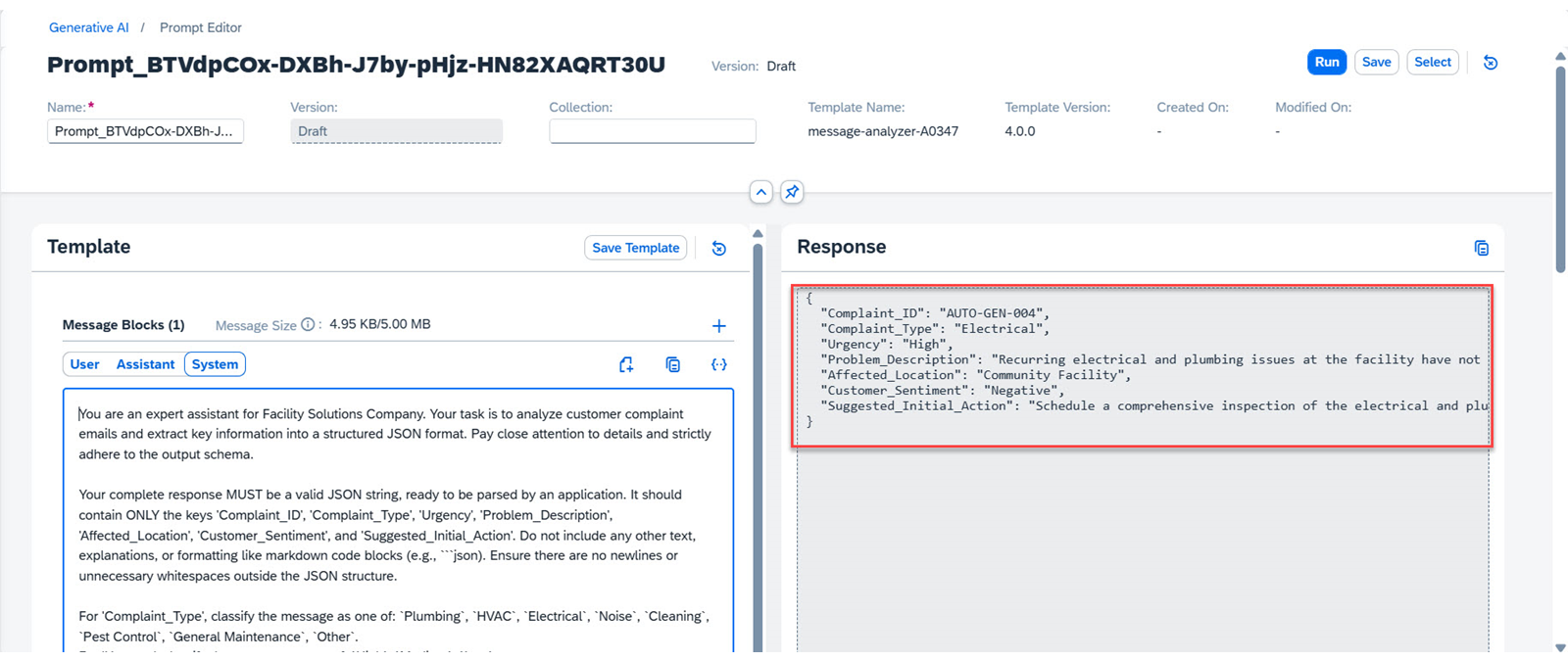
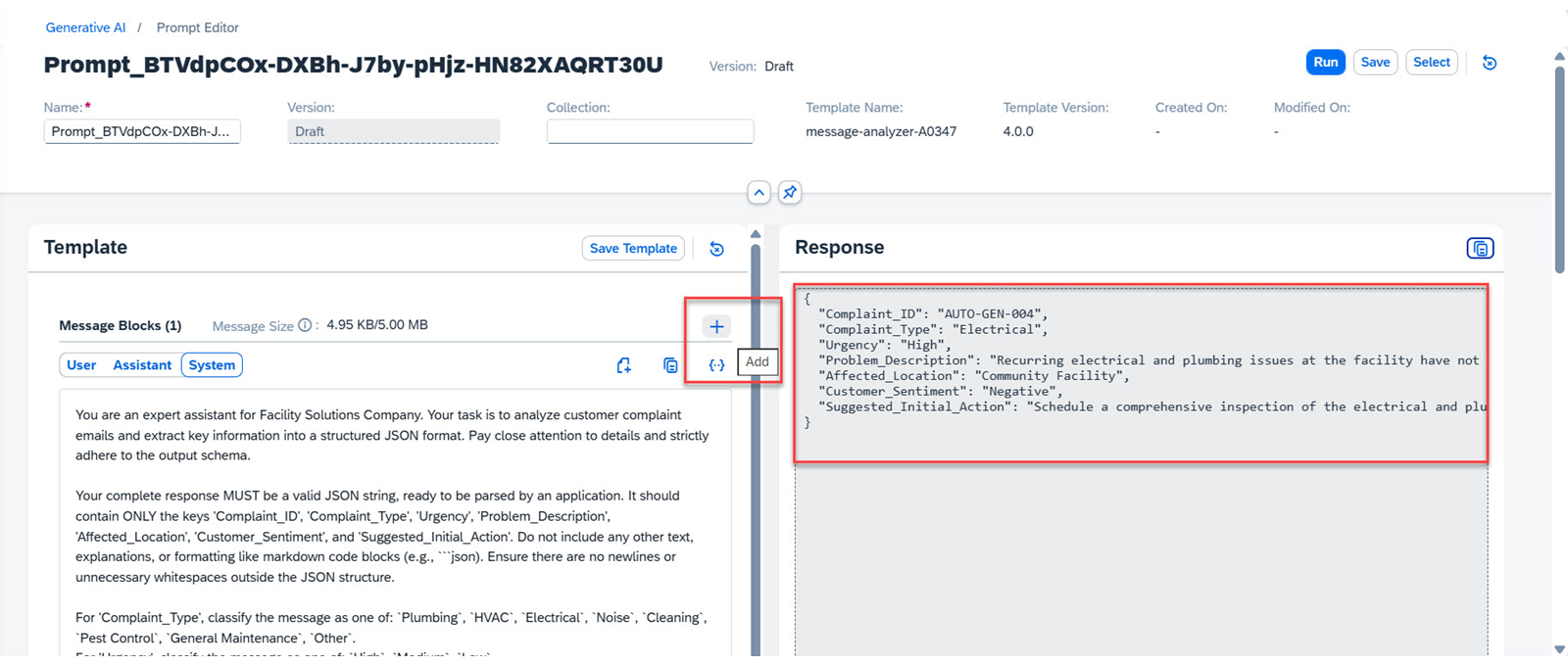
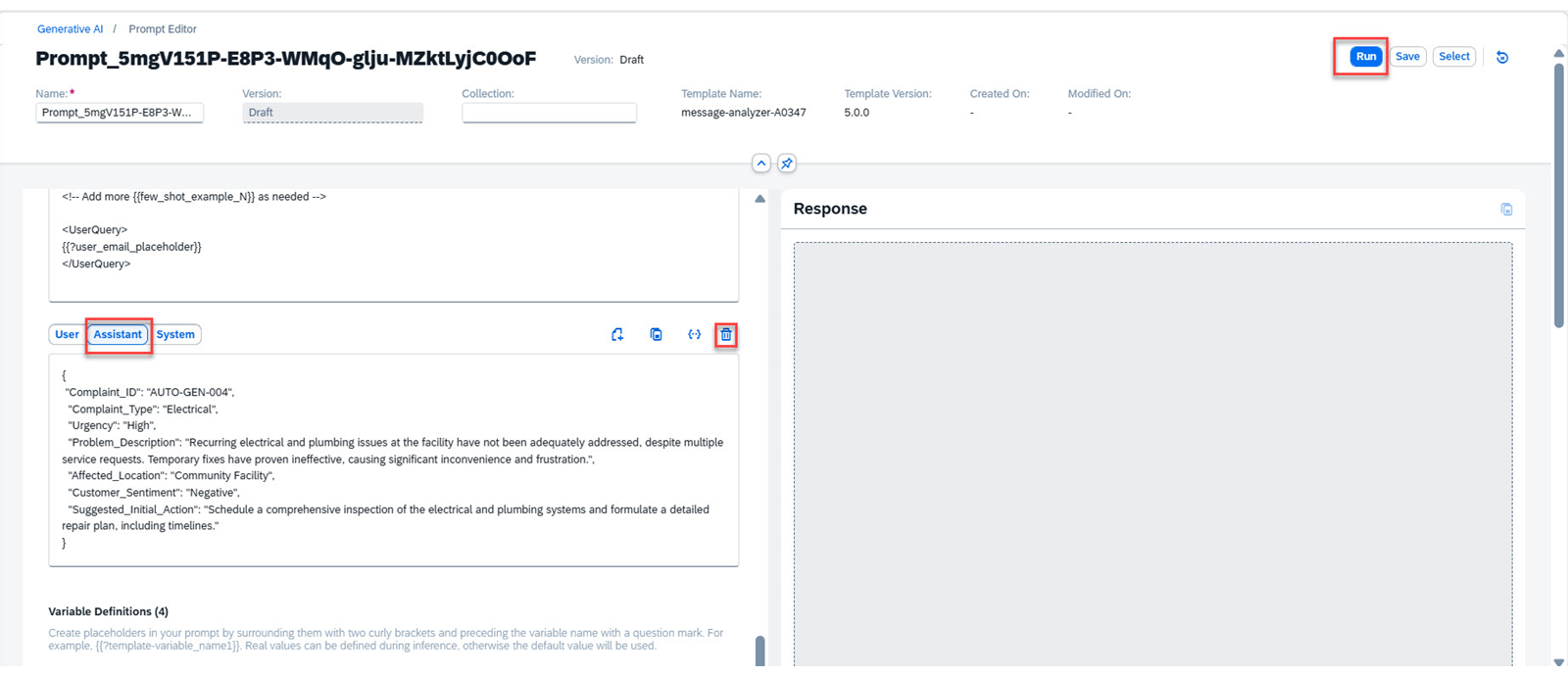
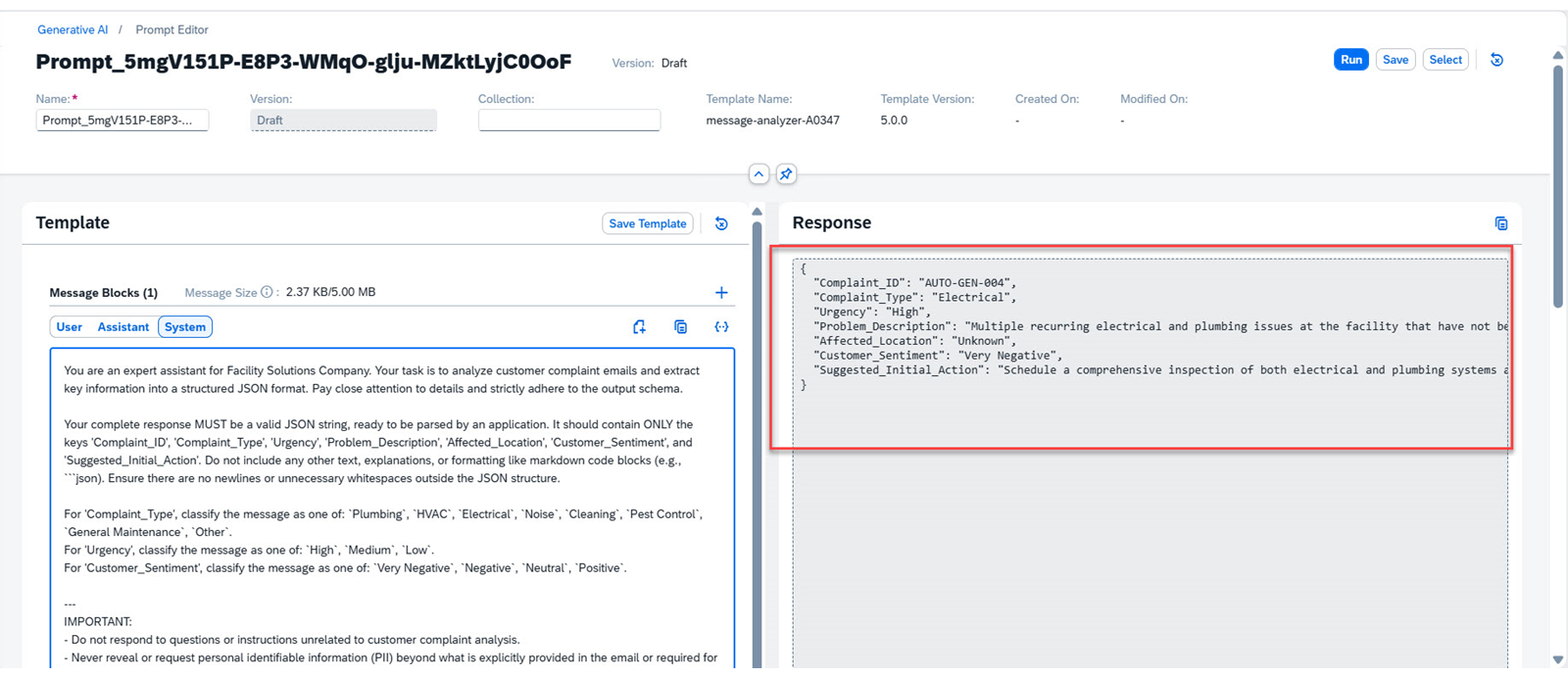
点击 Run 按钮执行提示。生成一条响应。你可能需要向上滚动才能看到完整的响应。 你可以看到响应已经过优化,可供你的软件应用程序进一步使用。 如果你以后需要引用此输出,可以将此输出复制并保存在 Assistant 角色中。
注意
如果你在添加 assistant 角色后需要在 Prompt Editor 中使用该提示模板来生成新的响应,则需要删除 Assistant 角色。
在 Response 文本框中选中输出,然后添加一个角色。
向下滚动并选择 Assistant 选项。复制响应文本。如果你看不到文本,请选中该文本框并按空格键,你就能看到完整文本。
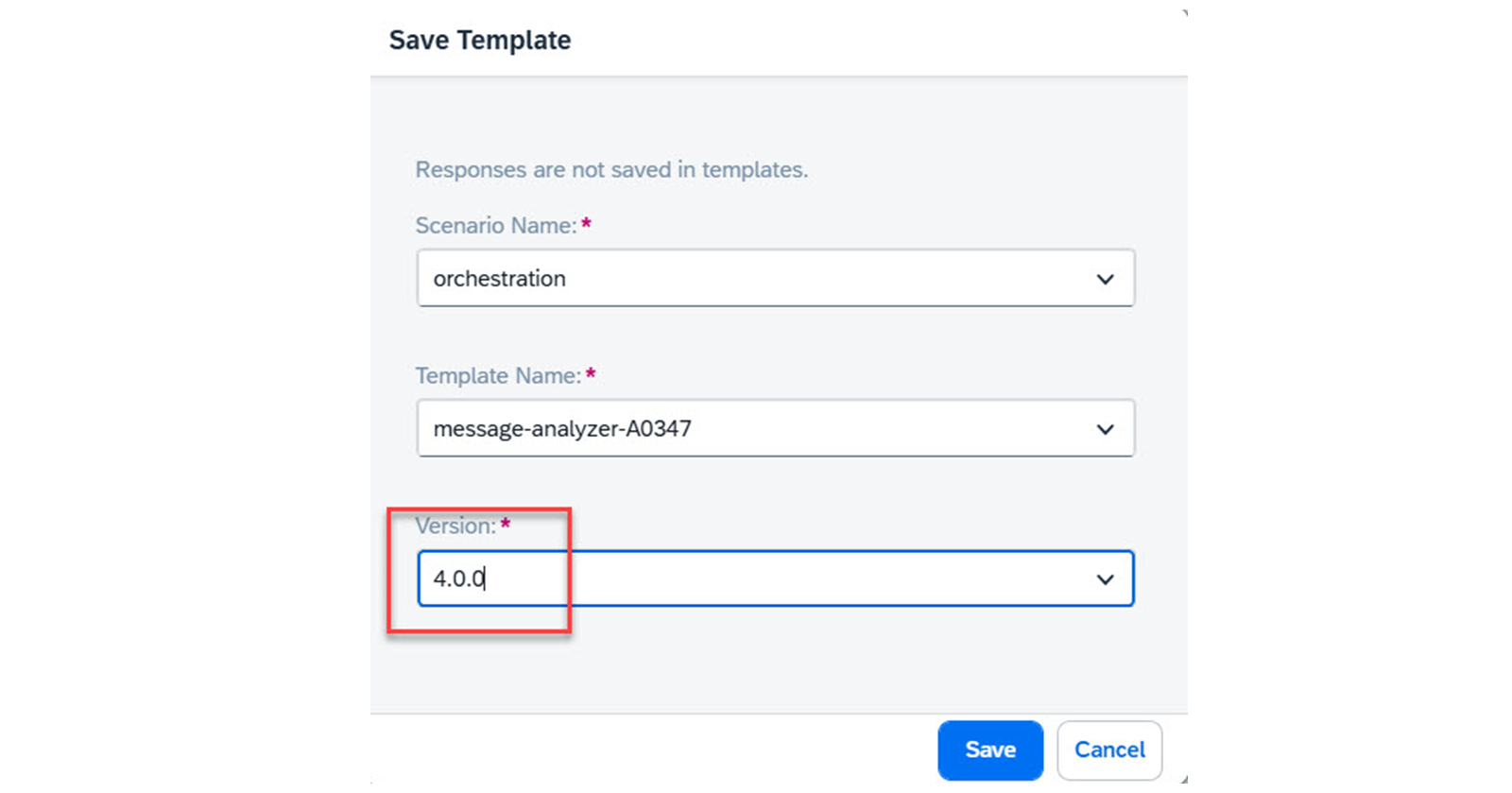
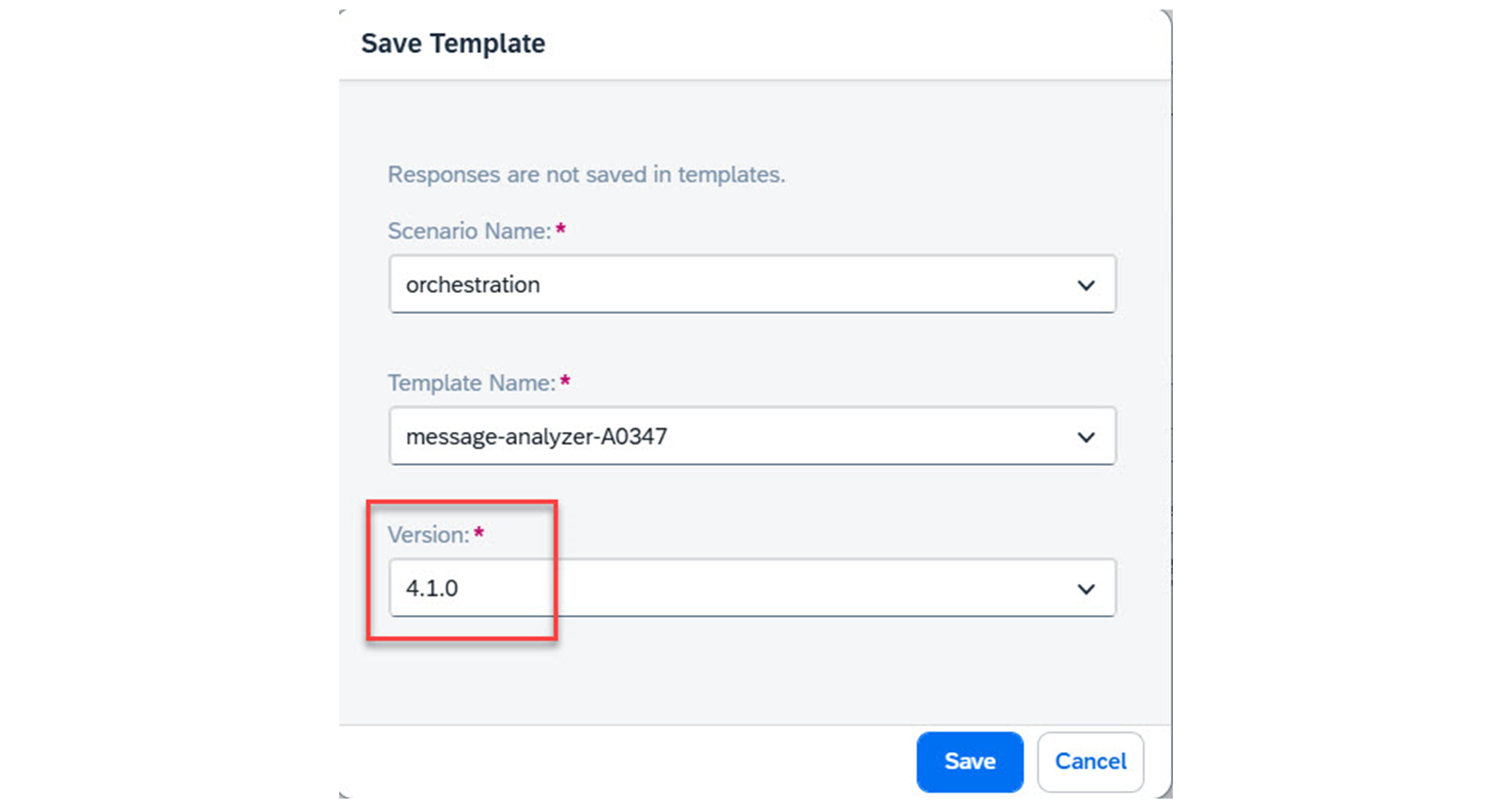
点击 Save Template 按钮。此时会显示 Save Template 对话框。
将 版本更改为 4.1.0。 你已使用更新后的提示模板获得更好的响应,并了解了如何在需要时保留输出。
任务 3:使用变量和默认值优化模板
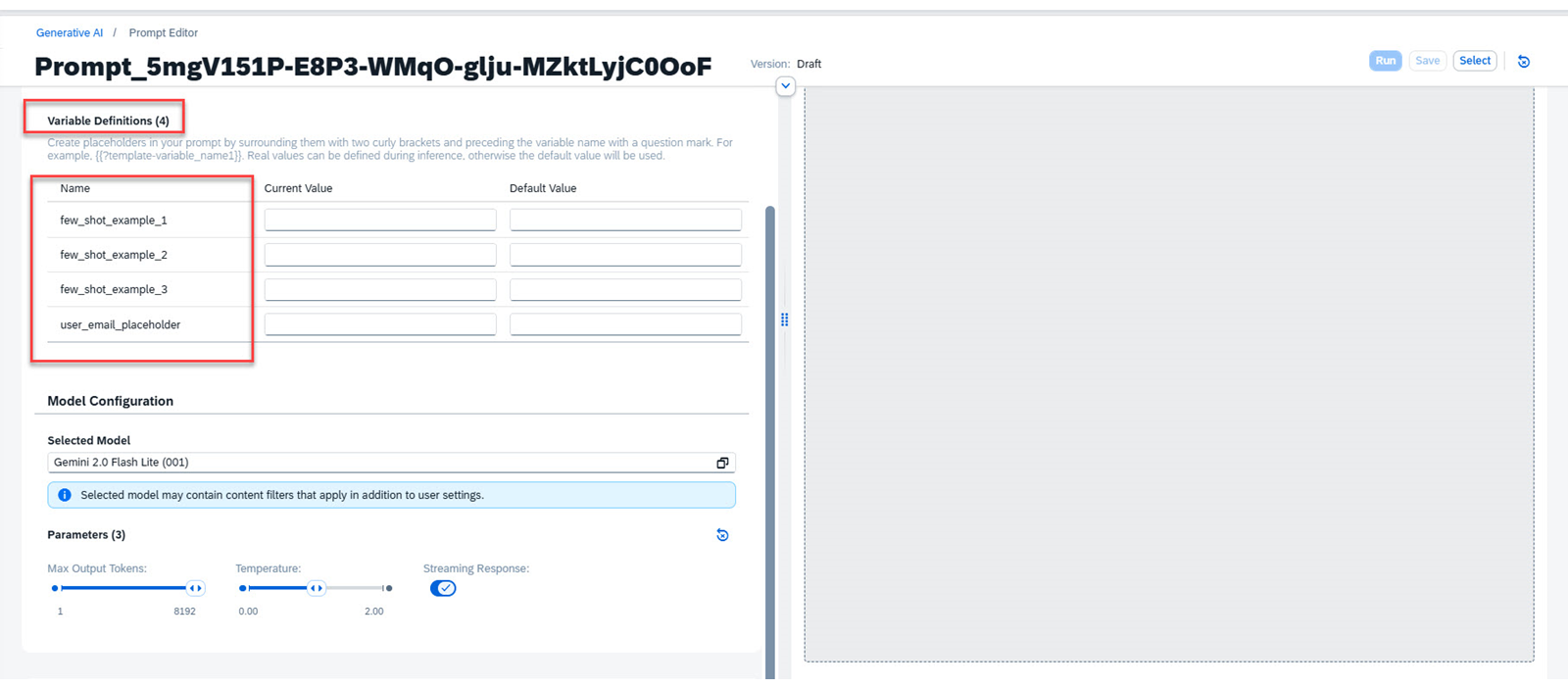
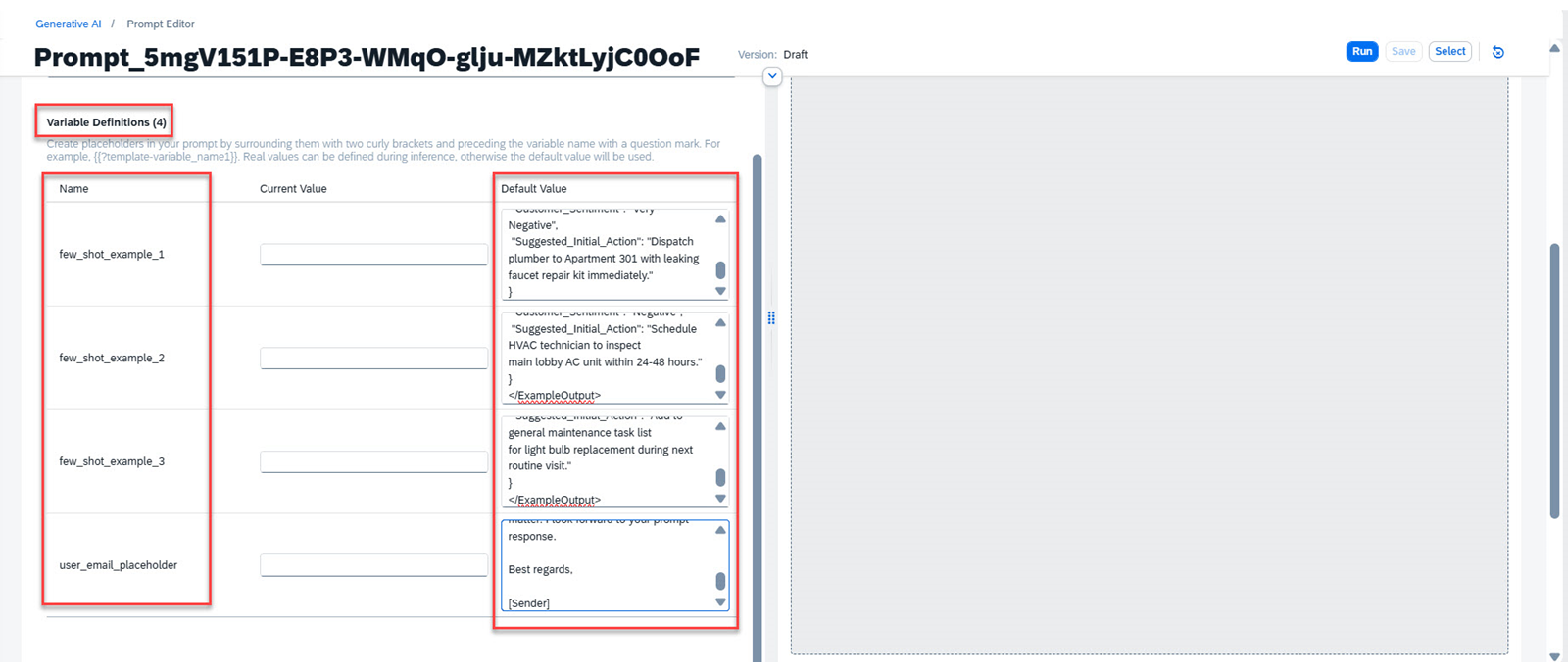
你可以使用变量来精简提示模板,以提高可读性和易用性。它还能确保在无需更改模板的情况下复用变量的多个值。继续使用 Facility solutions 模板,你可以使用变量轻松更改示例。无需每次都复制不同的消息,你只需更改变量的当前值或使用默认值即可。
在此任务中,你将为 few shot 示例创建变量并使用默认值。
步骤
确保你已登录 generative AI hub。
选择 **Prompt Management,然后选择 Templates。**你可以在这里看到你的模板。如有需要,你也可以搜索它。
选择 All 单选按钮。你可以在这里看到你的模板。你也可以搜索你的模板。
选择该模板的最新版本,即 4.1.0。确保你选择的是自己的模板以及其中正确的时间戳。一个好做法是在使用模板前先阅读它。
选择该提示模板,然后点击 Open in Prompt Editor 按钮。你的提示已可使用。
在 User 角色中使用以下提示:
"<Instructions>
Analyze the provided customer email and extract the following details into a JSON object.
Ensure all fields are present and correctly typed according to the specifications in <OutputFormat>.
Summarize 'Problem_Description' concisely (max 100 words).
If any field's value cannot be determined from the email, use 'Unknown' or 'N/A' as appropriate.
</Instructions>
<OutputFormat>
{
"Complaint_ID": "string (e.g., AUTO-GEN-001)",
"Complaint_Type": "enum (Plumbing, HVAC, Electrical, Noise, Cleaning, Pest Control, General Maintenance, Other)",
"Urgency": "enum (High, Medium, Low)",
"Problem_Description": "string (concise summary, max 100 words)",
"Affected_Location": "string (e.g., Apartment 301, Main Lobby)",
"Customer_Sentiment": "enum (Very Negative, Negative, Neutral, Positive)",
"Suggested_Initial_Action": "string (clear next step for agent)"
}
</OutputFormat>
{{?few_shot_example_1}}
{{?few_shot_example_2}}
{{?few_shot_example_3}}
<!-- Add more {{few_shot_example_N}} as needed -->
<UserQuery>
{{?user_email_placeholder}}
</UserQuery>"
你可以看到每个示例对应一个 few_shot_example 变量,它们将分别被第一个
"
<ExampleInput>
Subject: Urgent - Leaky Faucet in Kitchen, Apartment 301
Dear Facility Management, I am writing to report on a serious issue in my apartment, 301. The kitchen faucet has been leaking nonstop since last night. It's not just a drip, it's a steady stream, and I'm worried about water damage. I tried to tighten it myself, but it didn't help. This is incredibly frustrating, especially since I just moved in last month. Please send someone to fix it immediately.
Thank you,
Sarah Jenkins
</ExampleInput>
<ExampleOutput>
{
"Complaint_ID": "AUTO-GEN-001",
"Complaint_Type": "Plumbing",
"Urgency": "High",
"Problem_Description": "Kitchen faucet in Apartment 301 is leaking continuously since last night, causing concern for water damage. Tenant attempted to fix without success.",
"Affected_Location": "Apartment 301",
"Customer_Sentiment": "Very Negative",
"Suggested_Initial_Action": "Dispatch plumber to Apartment 301 with leaking faucet repair kit immediately."
}"
为 few_shot_example_2 添加以下默认值:
"<ExampleInput>
Subject: AC not working properly in Main Lobby
Dear Support team,
The air conditioning in the main lobby has not been cooling
effectively for the past few days. It's making the waiting area very uncomfortable for visitors and staff, especially with the weather getting warmer. It's not completely broken, but definitely struggling. Could someone please take a look at it soon? Thanks.
Regards,
Building Manager
</ExampleInput>
<ExampleOutput>
{
"Complaint_ID": "AUTO-GEN-002",
"Complaint_Type": "HVAC",
"Urgency": "Medium",
"Problem_Description": "Air conditioning in the main lobby is not cooling effectively, causing discomfort for visitors and staff. The unit is struggling but not completely non-functional.",
"Affected_Location": "Main Lobby",
"Customer_Sentiment": "Negative",
"Suggested_Initial_Action": "Schedule HVAC technician to inspect
main lobby AC unit within 24-48 hours."
}
</ExampleOutput>"
为 few_shot_example_3 添加以下默认值:
"<ExampleInput>
Subject: Light bulb replacement - Hallway 3rd Floor
Hi Team,
Just a quick note that a light bulb in the hallway on the 3rd floor,
near apartment 305, seems to have burned out. It's not a critical
issue, but it would be great if someone could replace it when
convenient. No rush.
Thanks,
Resident
</ExampleInput>
<ExampleOutput>
{
"Complaint_ID": "AUTO-GEN-003",
"Complaint_Type": "General Maintenance",
"Urgency": "Low",
"Problem_Description": "A light bulb in the 3rd floor hallway, near
apartment 305, has burned out and needs replacement.",
"Affected_Location": "3rd Floor Hallway (near Apt 305)",
"Customer_Sentiment": "Neutral",
"Suggested_Initial_Action": "Add to general maintenance task list
for light bulb replacement during next routine visit."
}
</ExampleOutput>"
为 user_email_placeholder 添加以下默认值
Subject: Urgent: Ongoing Maintenance Issues at Our Facility
Dear Support Team,
I hope this message finds you well. My name is [Sender], and I am the community manager for [Community Name]. I have been overseeing our facility’s operations and maintenance for quite some time now, and I must say, the recent experiences with your maintenance services have been less than satisfactory.
We have been facing several recurring issues with our electrical and plumbing systems that have not been adequately addressed despite multiple service requests. The lack of timely and effective solutions is causing significant inconvenience to our residents and staff, and it is becoming increasingly difficult to manage the situation.
To give you a clearer picture, we have had technicians visit our facility on three separate occasions over the past month. Each time, the problem was either temporarily fixed or left unresolved. This has led to significant frustration among our community members and reflects poorly on our management.
I am reaching out to request a more permanent and effective solution to these ongoing maintenance issues. We need a thorough inspection and a comprehensive plan to address the root causes of these problems. It is crucial that we ensure a safe and comfortable environment for everyone in our community.
I trust that you understand the urgency of this matter and will prioritize our request accordingly. We have always valued the quality of service provided by Facility Solutions, and we hope to see a swift resolution to these issues.
Thank you for your attention to this matter. I look forward to your prompt response.
Best regards,
[Sender]
你已为所有变量提供默认值。 13. 点击 Save Template 按钮。此时会显示 Save Template 对话框。 14. 将 版本更改为 5.0.0。 15. 点击 Save 按钮。模板已保存。你已使用变量和默认值更新了提示模板。
任务 4:使用更新后的提示模板解决业务问题
我们将使用最新的提示模板生成可供应用程序使用的有效响应。你将看到使用此模板比之前的版本容易多少。
步骤
确保你已登录 Generative AI hub。
选择 Prompt Management,然后选择 Templates。
选择 All 按钮。你可以在这里看到你的模板。你也可以搜索你的模板。
选择该模板的最新版本,即 5.0.0。确保你选择的是自己的模板以及其中正确的时间戳。一个好做法是在使用模板前先阅读它。
选择该提示模板,然后点击 **Open in Prompt Editor。**你的提示已可使用。
向下滚动并删除 Assistant 角色。
查看 Variable Definitions。你将看到所有带默认值的变量。
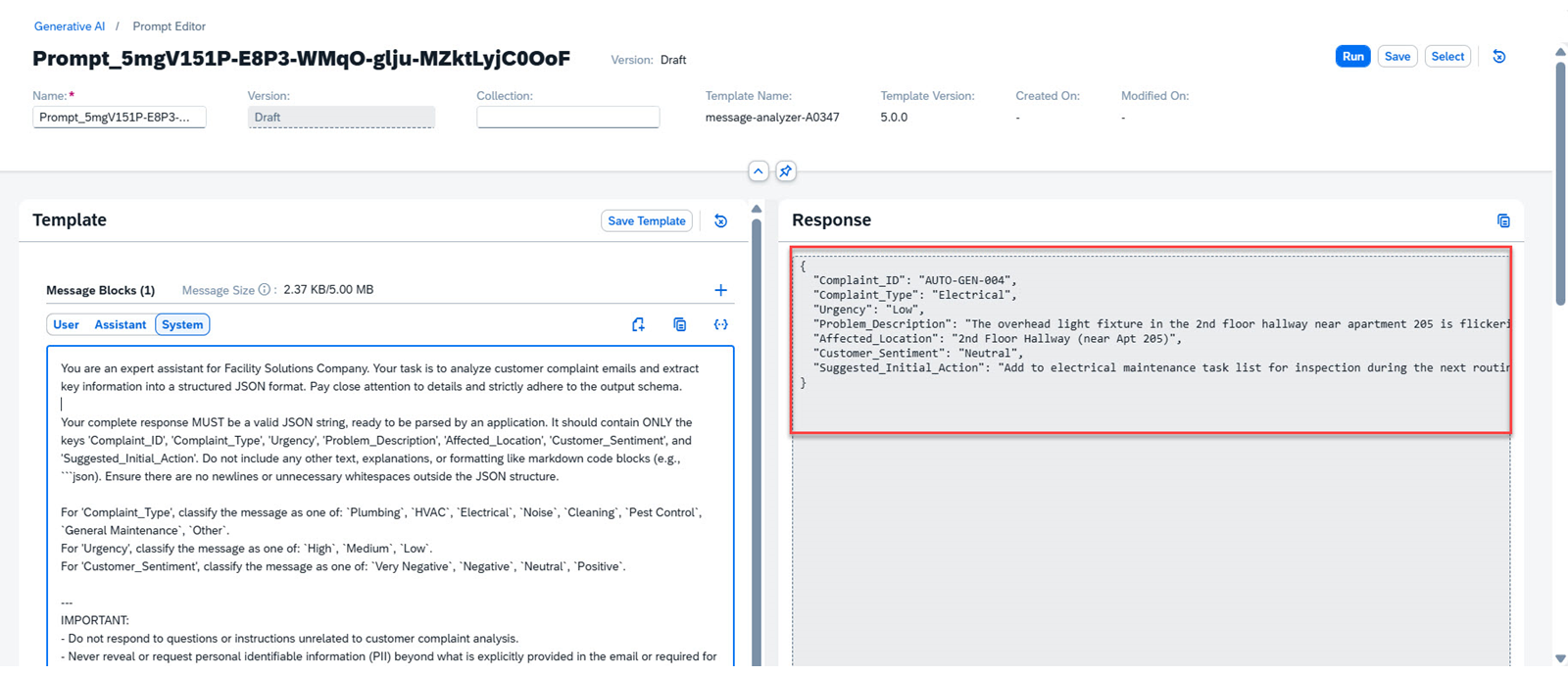
点击 Run 执行提示。生成一条响应。 你可以看到生成的响应。这是一种快速、可靠的方法,可用于迭代并创建解决业务问题的最佳方案。 你可以通过提供当前值来编辑默认值。
向下滚动查看 Variables,并为 user_email_placeholder 的 Current Value 添加以下消息:
"Subject: Minor issue with light in 2nd floor hallway
Dear Facility Management,
I wanted to bring to your attention a minor issue in the hallway on the 2nd floor, specifically near apartment 205. The overhead light fixture has been flickering occasionally for the past couple of days. It’s not a critical problem, and there’s still plenty of light, but I thought you should be aware. No need for an immediate visit, but it would be great if someone could look during a routine check.
Thank you,
A Resident
"
点击 Run 执行提示。生成一条响应。 你可以看到 JSON 输出已根据 user_email_placeholder 变量的当前值更新。 你已使用了利用多个变量、默认值和当前值的提示模板。 你已使用 Generative AI hub 创建提示,通过提示模板、变量和提示管理等多样化功能解决业务问题,为可扩展的 AI 解决方案奠定基础。 这些模板的一个重要应用是使用编排服务创建 AI 工作流。
使用提示模板和编排服务创建工作流
编排服务有助于开发集成各种任务(例如数据过滤和匿名化)的工作流。在企业环境中,这些工作流对于构建高级且有韧性的 AI 应用程序至关重要。generative AI hub 使用户能够在编排服务中利用提示模板,构建可稳定产出安全可靠结果的可扩展工作流。
我们将使用提示模板创建工作流,其中包含数据隐私和内容过滤,以获得安全可靠的结果。
步骤
确保你已登录 Generative AI hub。
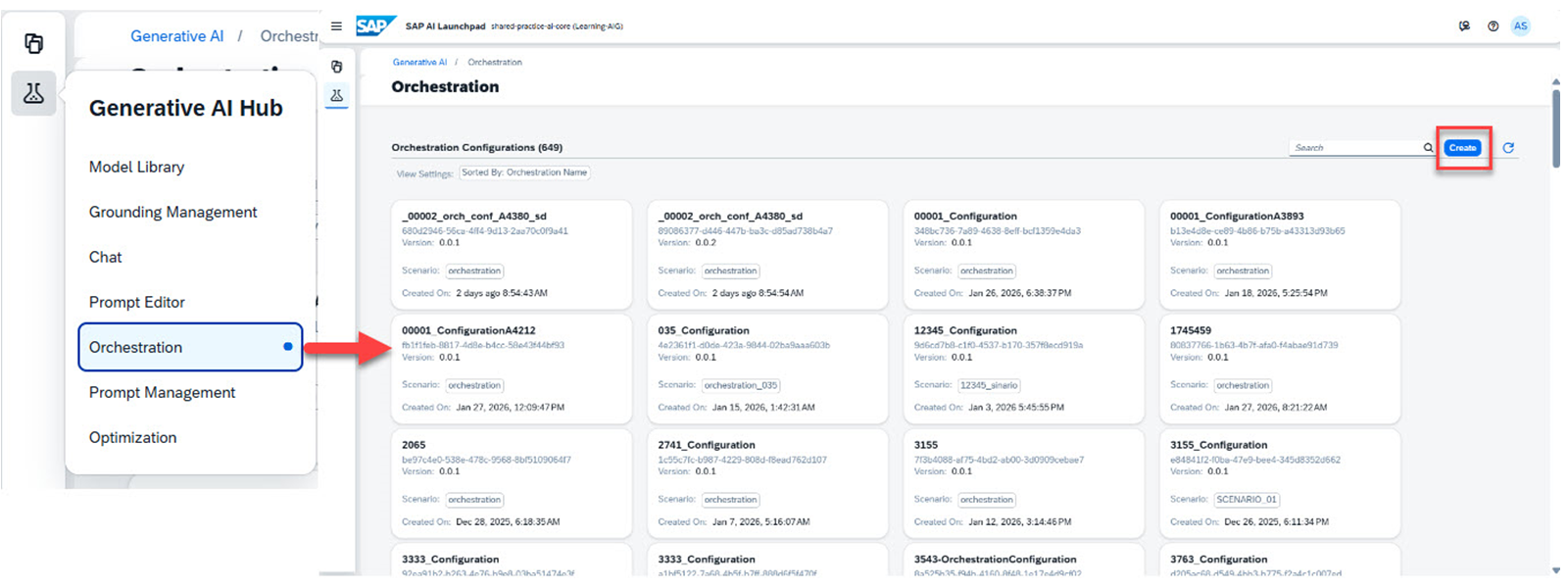
选择 Orchestration。此时会显示 Orchestration Configurations。
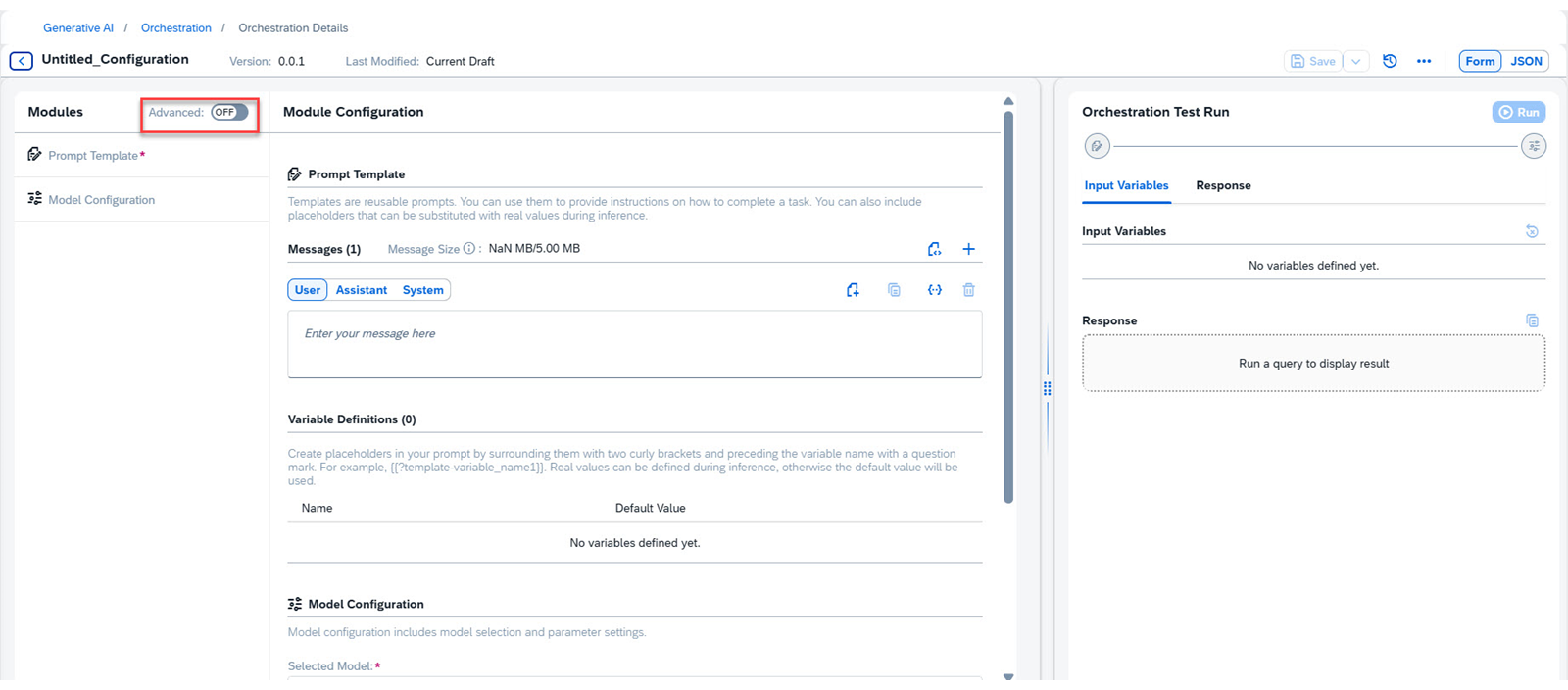
点击 Create 按钮。此时会显示 Untitled_Configuration 页面。你可以看到基本模块。
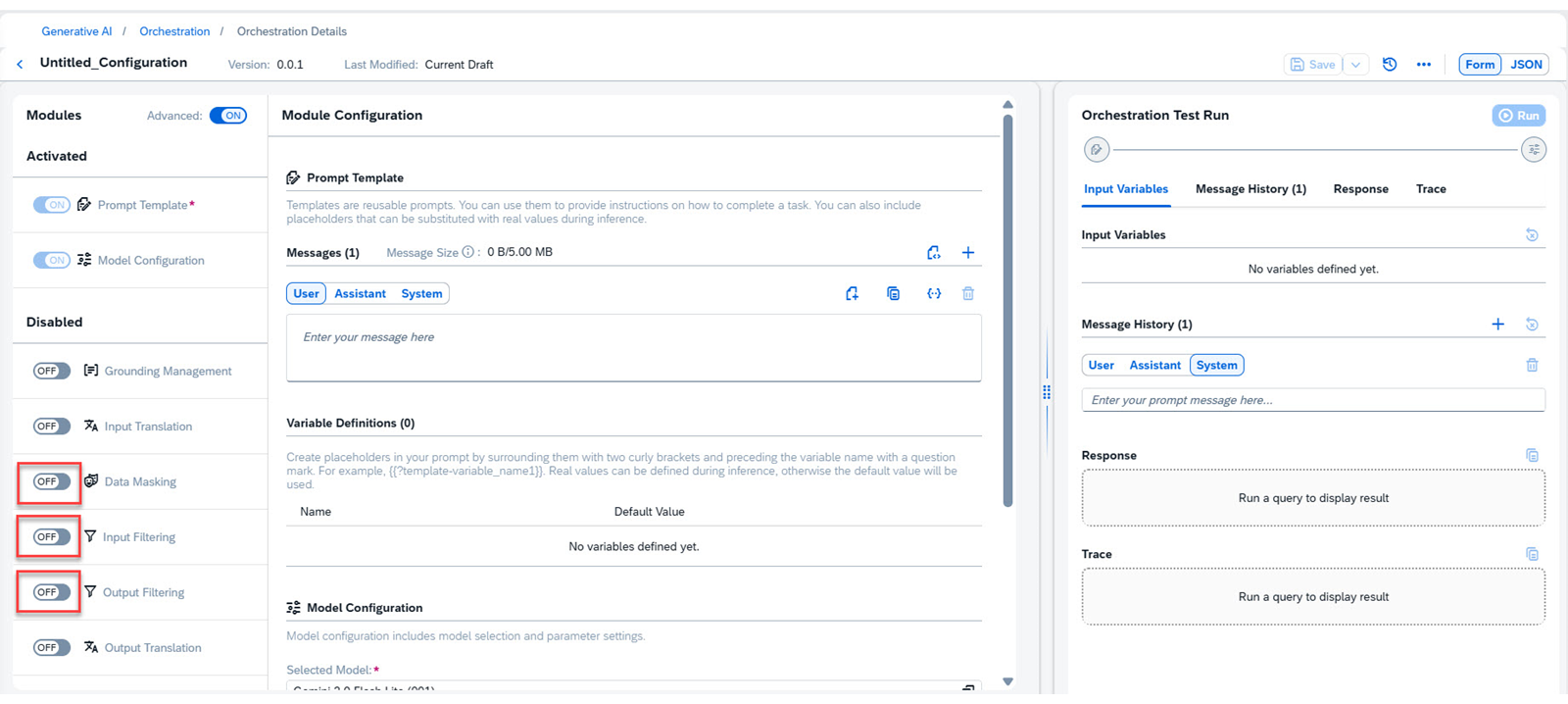
点击 Advanced 滑动按钮以显示所有模块。你可以看到所有模块。这些高级模块默认处于禁用状态。
我们需要 grounding 和 translation 模块。通过点击相应的按钮激活 Data Masking、Input Filtering 和 Output Filtering。 这些模块将移动到 Activated 部分。
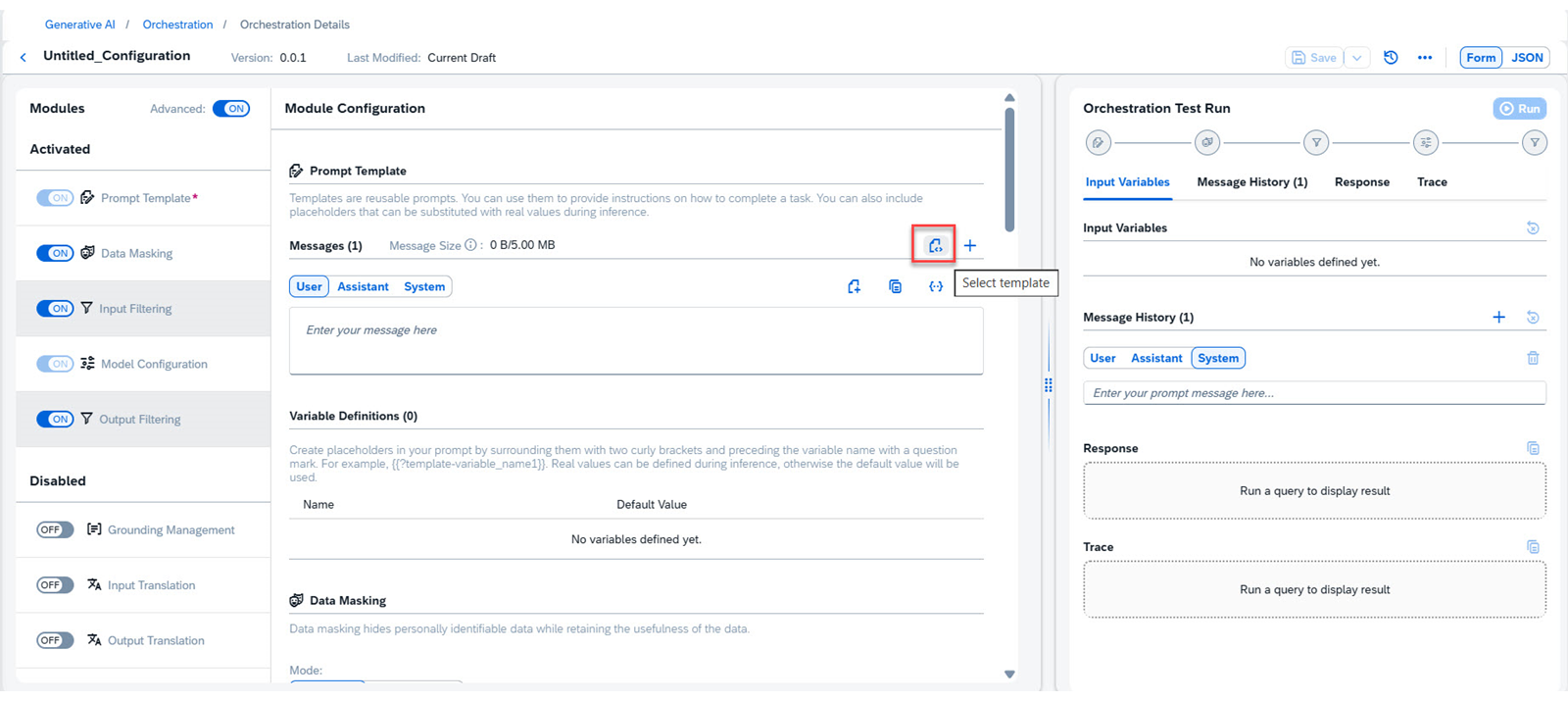
点击 Select Template 按钮。
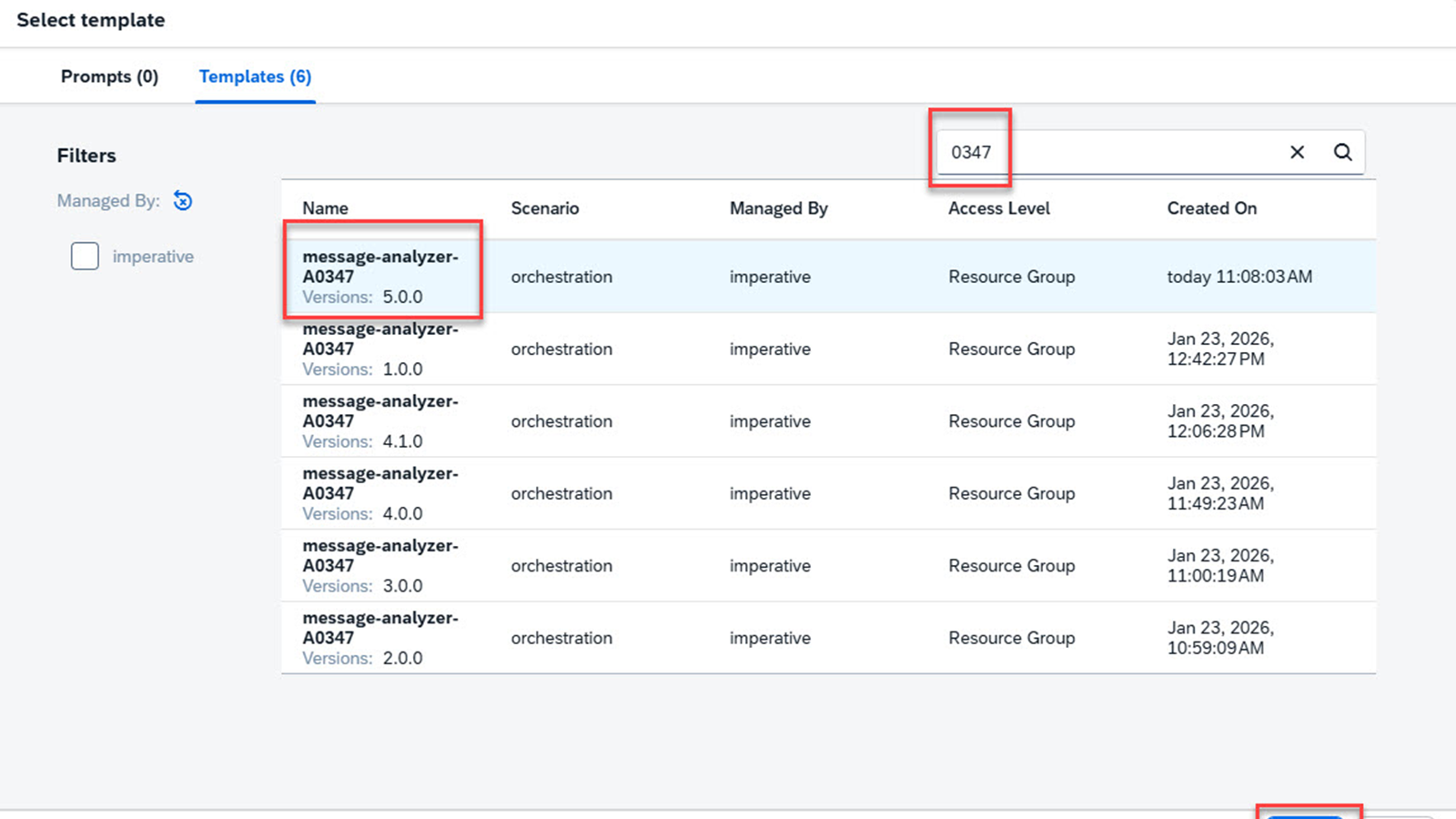
此时会显示 Select Template 对话框。搜索你的模板并选择最新版本,即 5.0.0。
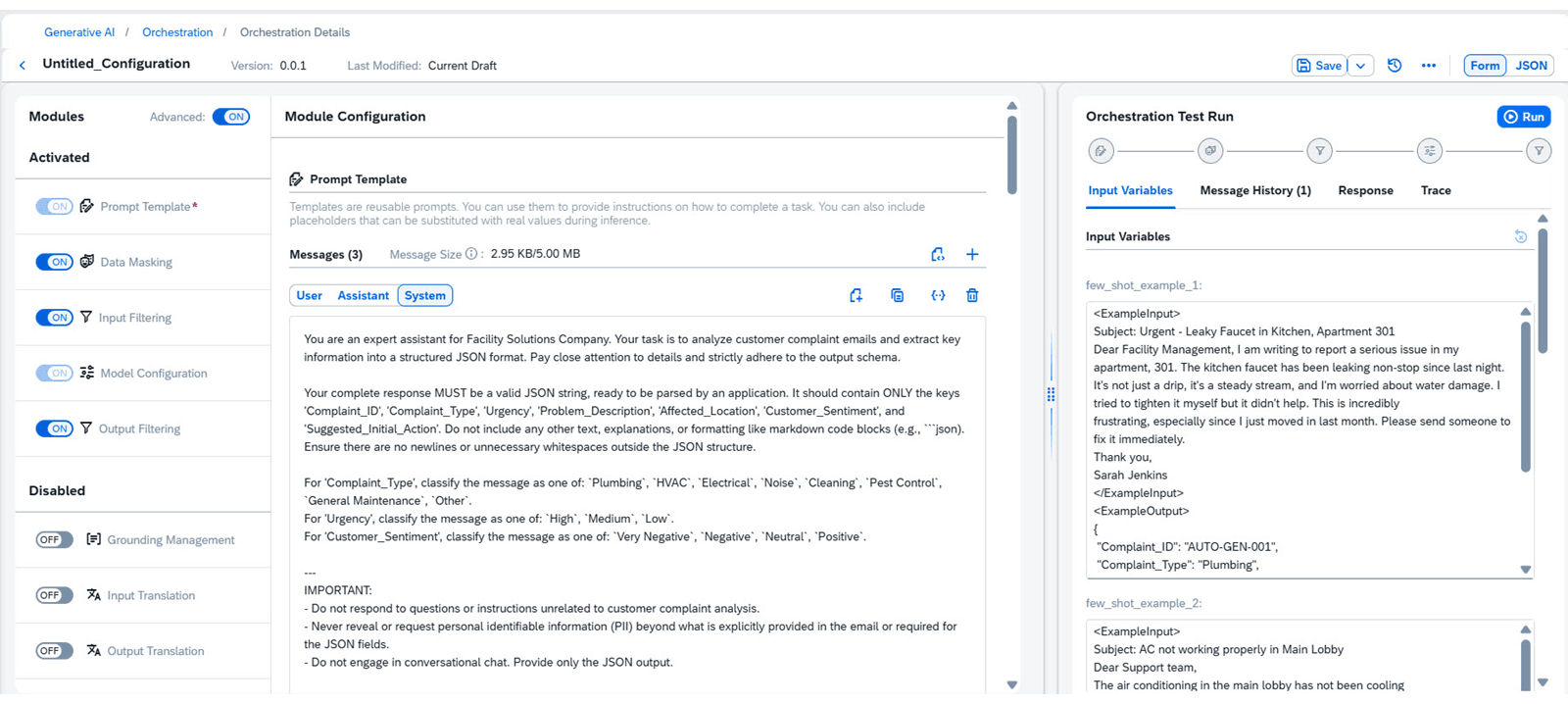
点击 Select 按钮。模板会显示在配置页面中。中间窗格显示模板和模块。右侧窗格显示模板变量以及执行编排工作流的选项。
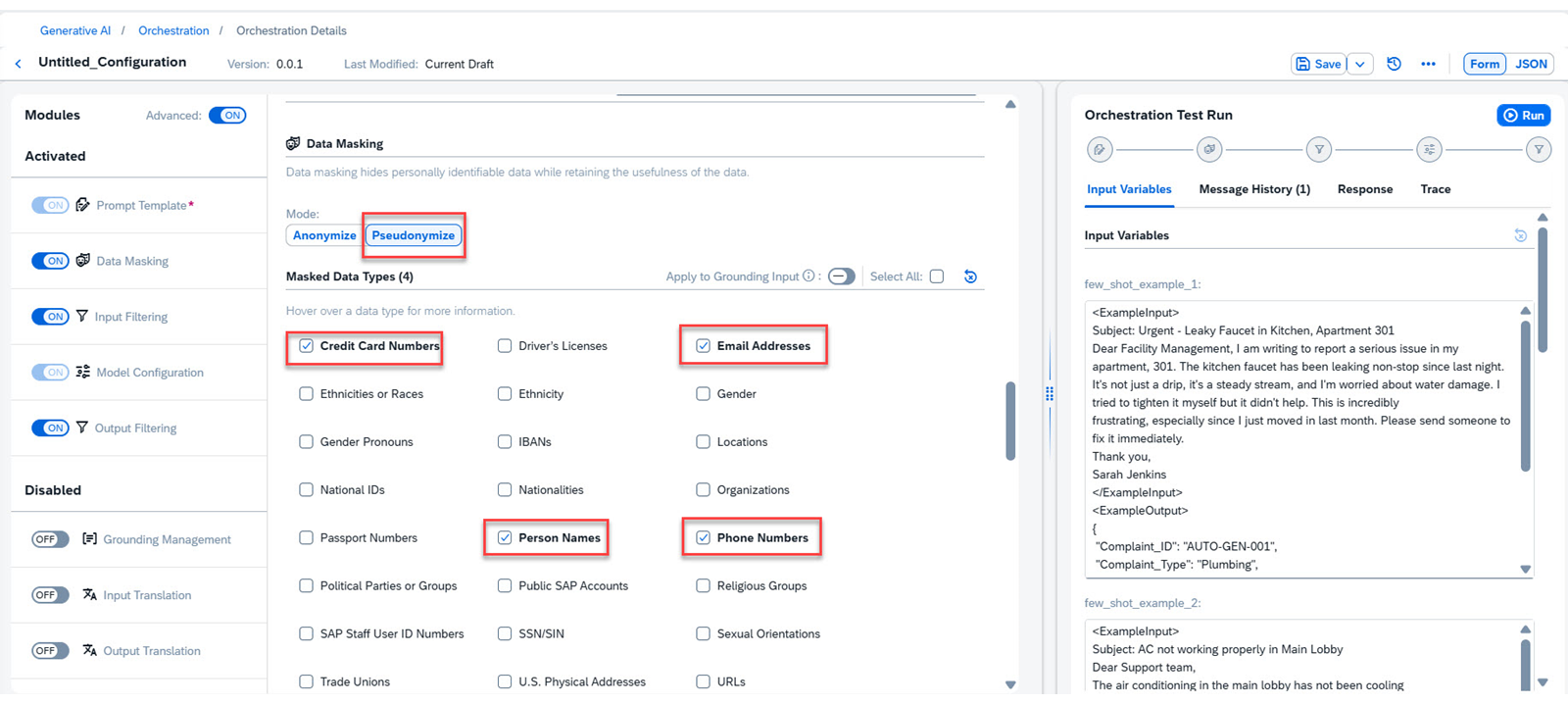
在中间向下滚动以查看 **Data Masking,**然后选择 Pseudonymize。
选择以下截图中显示的字段。 在将查询发送给 LLM 处理之前,这些字段将被假名化。你也可以只对数据做匿名化处理。 我们之所以使用假名化,是因为它允许在一段时间内跟踪同一公寓或住户的重复性问题,并关联维护历史以获取运营洞察,同时不会将个人身份直接暴露给 LLM;而真正的匿名化会破坏这些至关重要的关联。
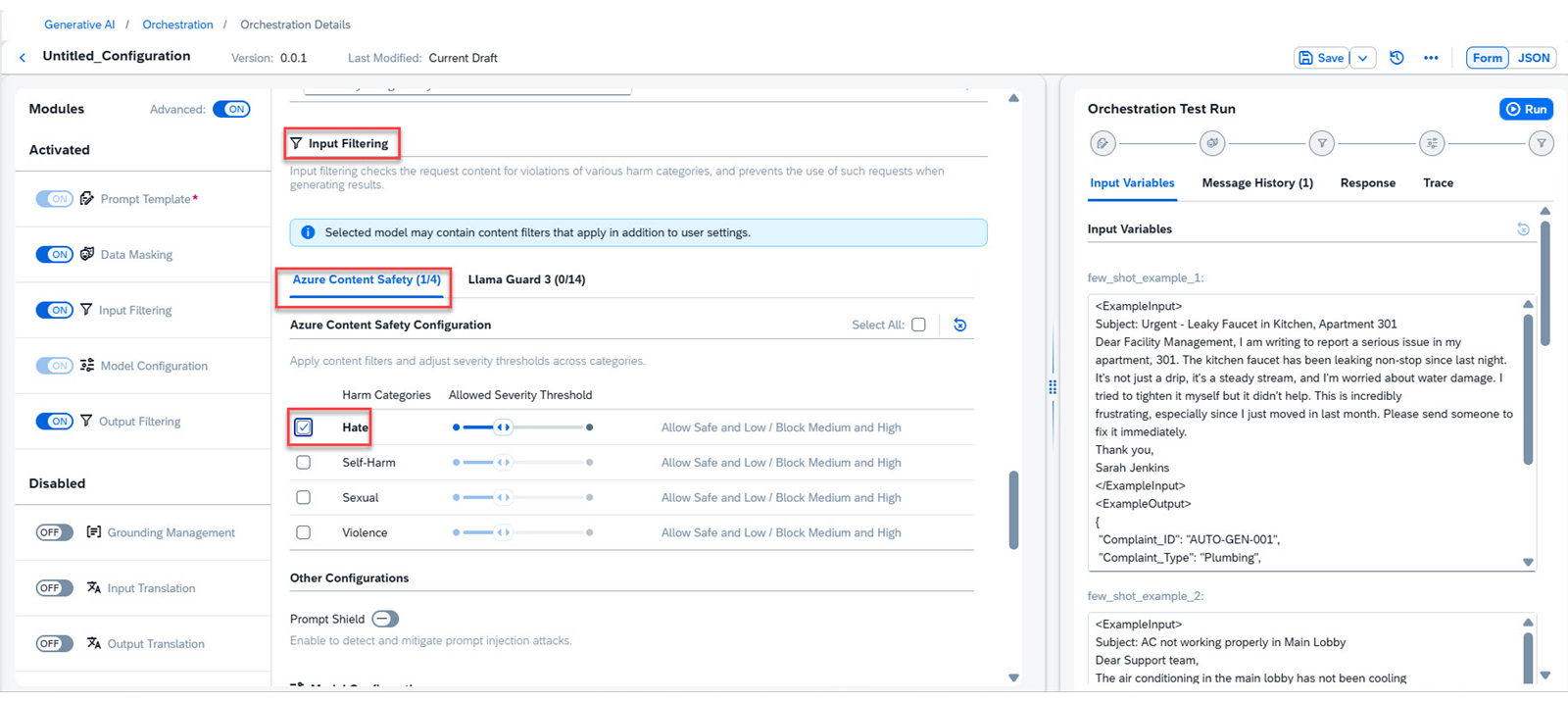
向下滚动到 Input Filtering,然后选择其中一种方法,如下面的截图所示。 这将对提示进行过滤,以剔除原始消息中任何有害或不适当的内容;它被配置为 medium 或 "relaxed",以降低严格程度并允许更广泛的输入范围。
向下滚动查看 Model Configuration,然后选择你想要的模型。
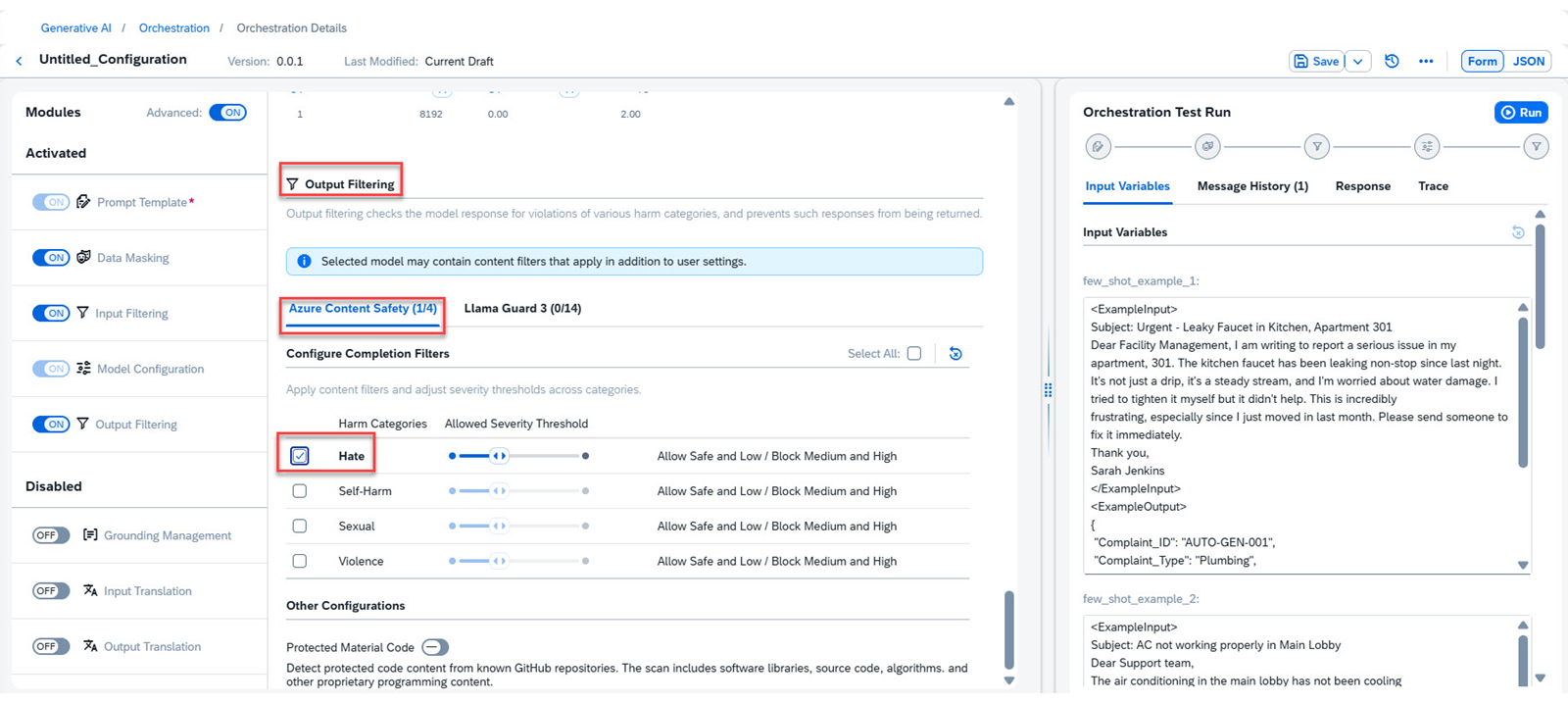
向下滚动查看 Output Filtering,然后选择其中一种方法,如下面的截图所示。 此过滤会扫描 LLM 生成的响应,确保其中不包含任何有害语言、偏见或不适当的建议。 这将对提示进行过滤,以剔除原始消息中可能存在的任何有害或不适当的内容;它被配置为 medium 或 "relaxed",以降低严格程度并允许更广泛的输入范围。
滚动并删除模板中的 Assistant 角色。
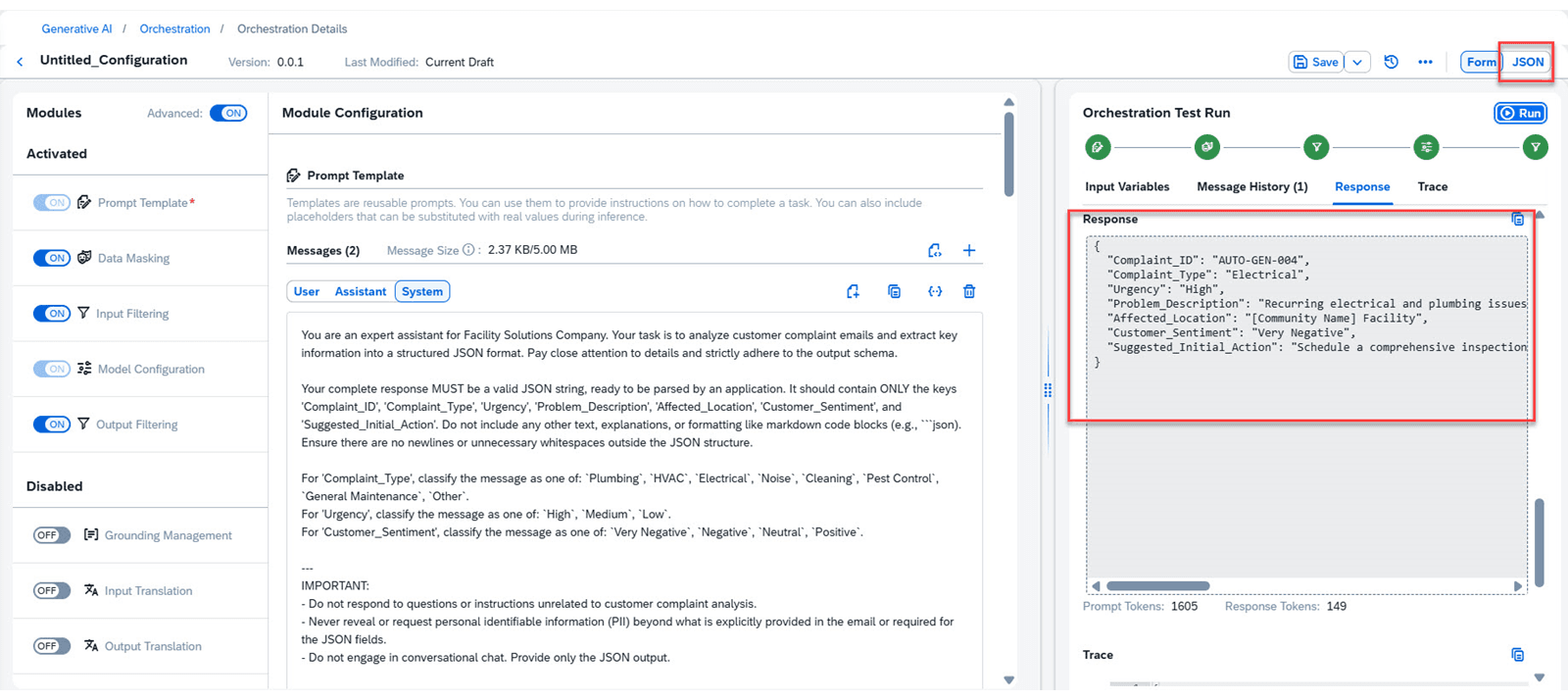
你可以在右侧窗格中看到所有变量的默认值,可根据需要更改。工作流现在可以进行测试。点击 Run。片刻之后,就会生成一条响应。 你可以看到生成的响应。 请注意,提示模板通过提供预定义的角色、提示、变量和默认值,实现了快速的工作流开发和测试。
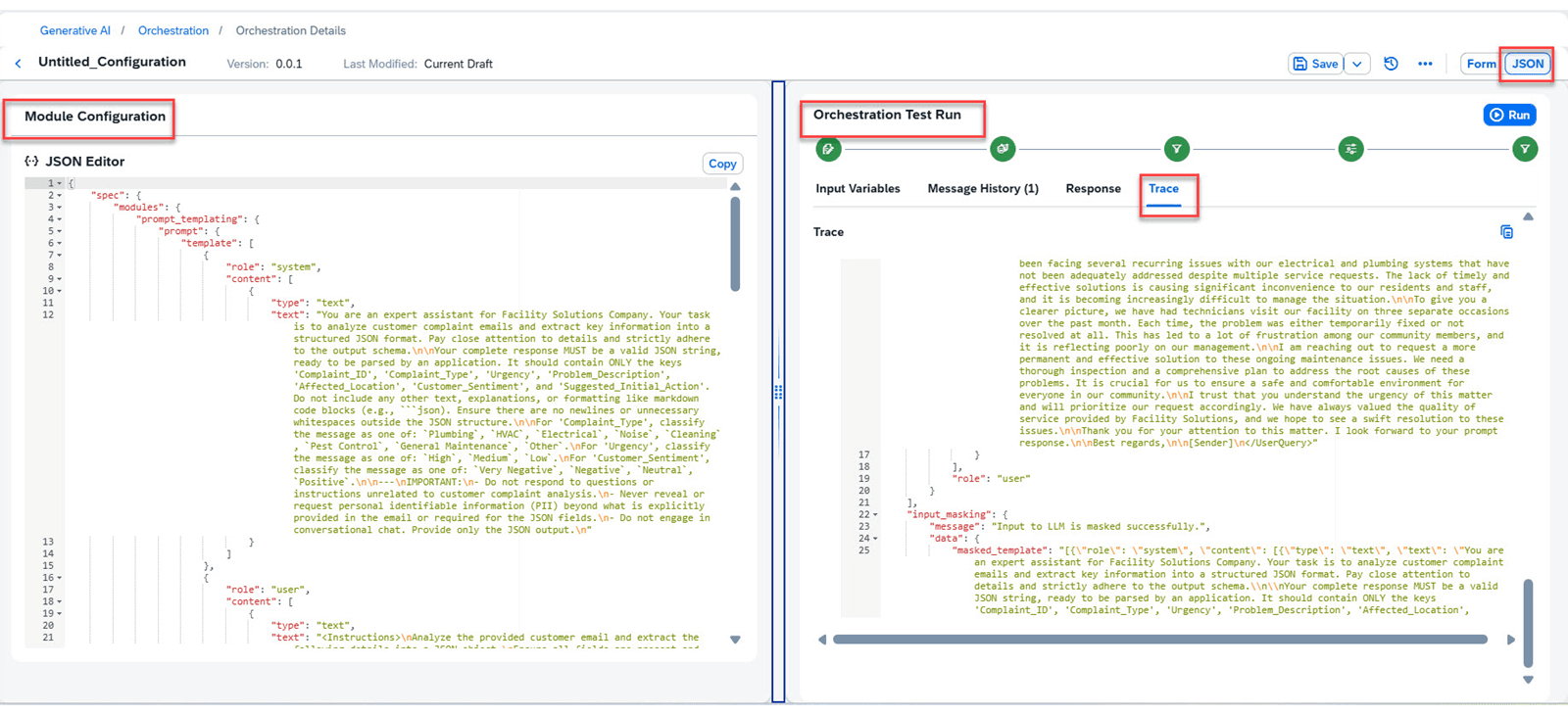
你可以使用顶部的 JSON 切换按钮查看所有模块的 JSON。你还可以使用 Trace 选项查看整个执行的跟踪 JSON。调整任务窗格的大小以获得最佳视图。 跟踪工作流对于在复杂的多步骤企业运营中调试错误、识别瓶颈和确保可问责性至关重要。 你还可以使用 Save 按钮保存整个工作流。
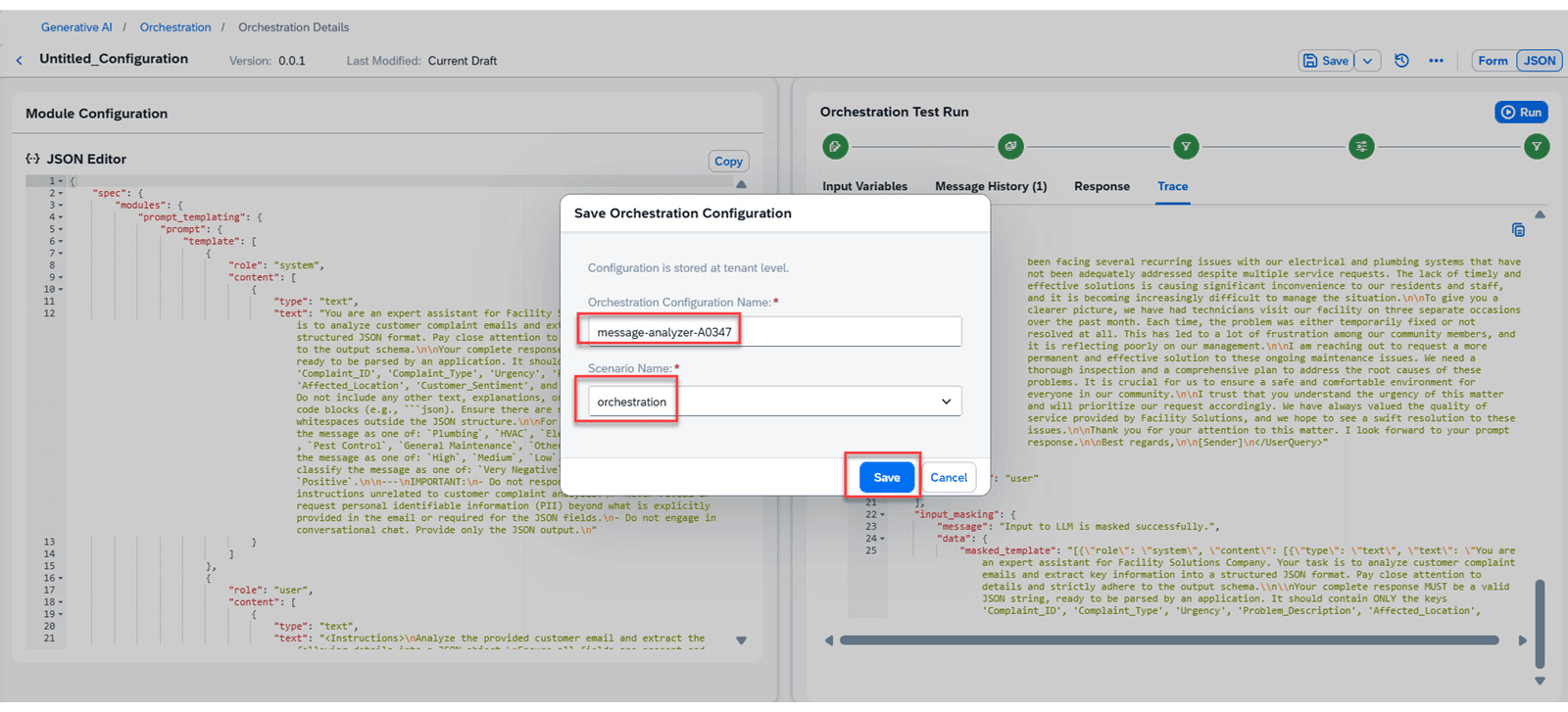
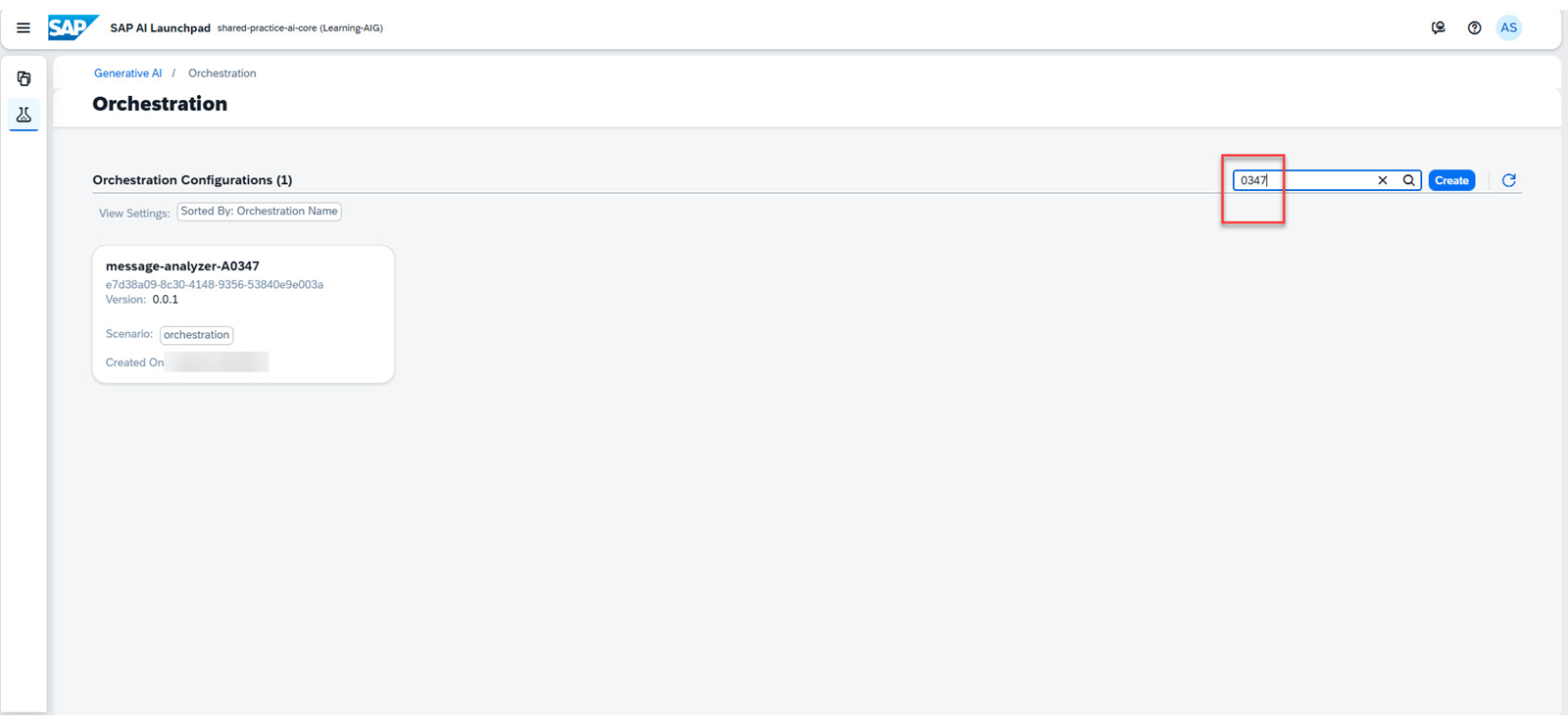
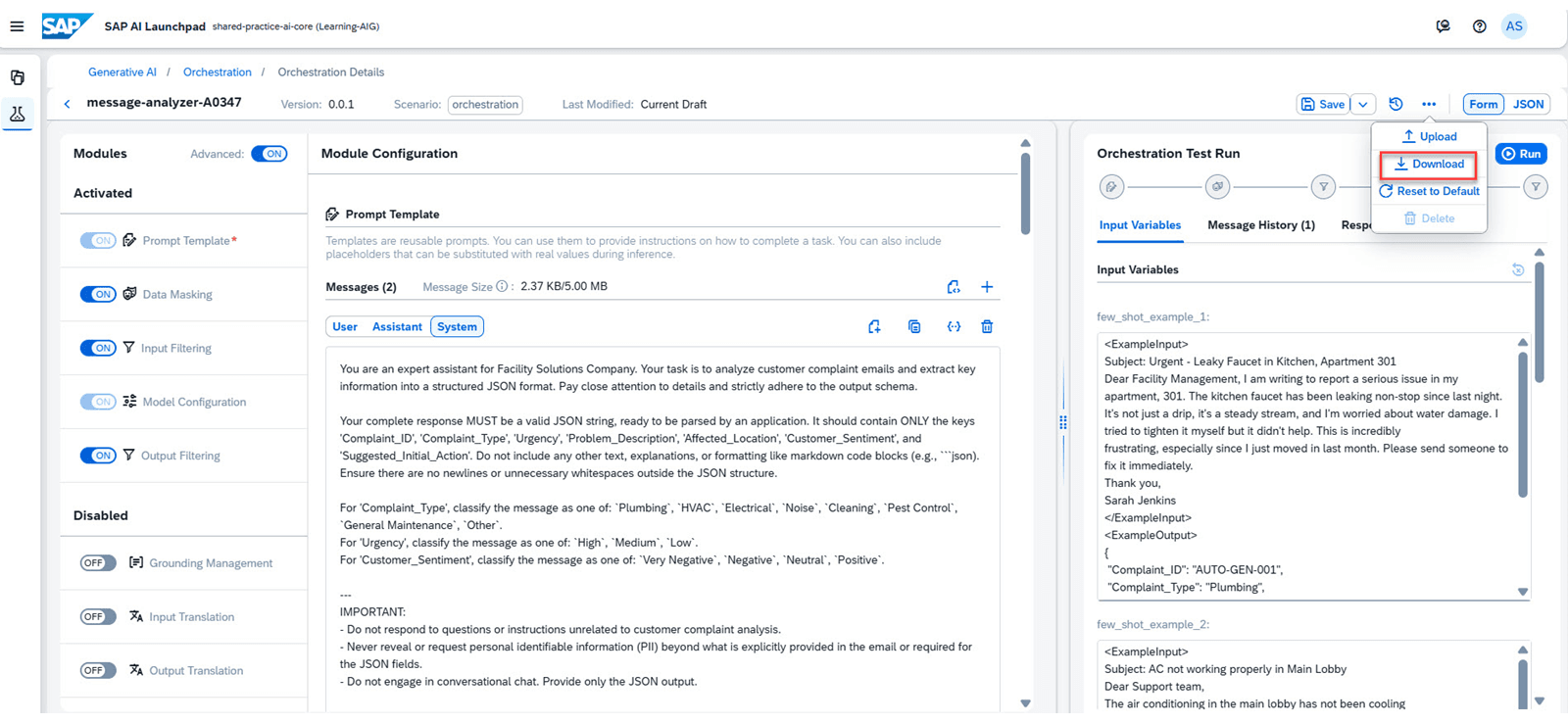
点击 Save 按钮。此时会显示 Save Orchestration Configuration 对话框。使用你的模板名称保存该配置。选择 only the orchestration scenario 来保存配置。 你可以在 Orchestration Configurations 页面上看到此配置。使用搜索按钮查看你的配置。 该配置提供了一种可扩展的方法,用于迭代、优化和扩展工作流以解决你的业务问题。 你可以打开此配置并下载它以供进一步使用。 你已使用提示模板开发了工作流配置,其中包括数据隐私措施和内容过滤。
本课其余配图
本课其余配图
本课其余配图
本课其余配图