使用 SAP Cloud SDK for AI 释放 LLM 的强大能力
学习目标
使用 SAP Cloud SDK for AI 构建基本提示。
在本课中,我们将探讨在生成式 AI 中枢中开发提示的实践艺术。基于你对 SAP Cloud SDK for AI 和编排服务的理解,你将学习一种迭代的、循序渐进的方法来优化提示,从而从文本中提取精确的、结构化的信息,并可供你的 SAP 应用程序消费。
你已经安装并配置了 SAP Cloud SDK for AI (Python) - generative。你也已经配置了编排服务。在本课中,我们将从安装包开始,然后加载数据。
!pip install -U "generative-ai-hub-sdk>=3.1" tqdm
这段代码安装必要的软件包。通过使用 !pip install -U "generative-ai-hub-sdk>=3.1" tqdm,它确保你拥有最新版本的 SAP Cloud SDK for AI (Python) - generative(3.1 或更高版本)以及 "tqdm" 库。"tqdm" 包是一个进度条库,有助于在控制台中显示任务进度。
你需要设置一个用于与 AI Core 服务交互的 AI Core 客户端,并导入必要的模块、从 JSON 文件加载凭据,以及设置身份验证和服务访问所需的环境变量。详情请参见此处的代码。
请参阅仓库中的详细代码以及相关文件 Solving Your Business Problems Using Prompts and LLMs in SAP's Generative AI Hub。
from typing import Literal, Type, Union, Dict, Any, List, Callable
import re, pathlib, json, time
from functools import partial
EXAMPLE_MESSAGE_IDX = 10
这段代码首先从多个 Python 库导入必要的模块和类型,包括 typing、re、pathlib、json、time 和 functools。然后它定义了一个常量 EXAMPLE_MESSAGE_IDX,值为 10,用于从数据集中选择随机的第 10 条消息。
接下来,你需要加载并预处理存储在 JSON 文件中的电子邮件数据集。你可以将数据集拆分为开发集和测试集,并创建一个较小的测试集以进行更聚焦的评估。你还可以处理电子邮件数据,将类别、紧急程度和情感提取并整理成集合,以便进一步分析。
辅助函数
在使用 SAP Cloud SDK for AI (Python) - generative 开发提示之前,你需要启用生成式 AI 中枢中 AI 模型的使用。这通过辅助函数来完成。你可以在此处的仓库中查看详细的函数。
其中一个函数与 AI Core SDK 对接,以高效管理部署任务。它包含一个 spinner 函数,用于在长时间操作期间提供实时更新,保持用户参与度。该函数会检查是否存在现有部署,并相应地检索它或创建新部署,协调配置并确保在指定的超时时间内顺利执行。请参阅仓库中的详细代码。
如果在执行代码时遇到任何错误或问题,你可以参考一些故障排除提示。
以下函数用于设置并向 AI 编排服务发送请求。
import pathlib
import yaml

from gen_ai_hub.proxy import get_proxy_client
from ai_api_client_sdk.models.status import Status

from gen_ai_hub.orchestration.models.config import OrchestrationConfig
from gen_ai_hub.orchestration.models.llm import LLM
from gen_ai_hub.orchestration.models.message import SystemMessage, UserMessage
from gen_ai_hub.orchestration.models.template import Template, TemplateValue
from gen_ai_hub.orchestration.service import OrchestrationService

client = get_proxy_client()
deployment = retrieve_or_deploy_orchestration(client.ai_core_client)
orchestration_service = OrchestrationService(api_url=deployment.deployment_url, proxy_client=client)

def send_request(prompt, _print=True, _model='meta--llama3.1-70b-instruct', **kwargs):
config = OrchestrationConfig(
llm=LLM(name=_model),
# template=Template(messages=[SystemMessage(prompt),UserMessage("{{?input}}")
template=prompt
)
template_values = [TemplateValue(name=key, value=value) for key, value in kwargs.items()]
answer = orchestration_service.run(config=config, template_values=template_values)
result = answer.module_results.llm.choices[0].message.content

if _print:
formatted_prompt = "\n".join([t.content for t in answer.module_results.templating])
print(f"<-- PROMPT --->\n{formatted_prompt}\n<--- RESPONSE --->\n{result}")

return result
它导入必要的库和模块,设置代理客户端,并检索或部署编排配置。它定义了一个函数 "send_request",用于配置并向 AI 模型发送提示,然后格式化并打印响应。该函数可以通过编排部署访问生成式 AI 中枢实例中所有已配置的模型。此设置旨在使用一致且可复用的方法简化由 AI 驱动的任务。
使用 SAP Cloud SDK for AI (Python) - generative 开发提示
我们现在要找出收到的邮件中的紧急程度和情感。
使用以下代码读取一条随机邮件,其 ID 是之前指定的。
mail = dev_set[EXAMPLE_MESSAGE_IDX]
正如我们之前所见,开发提示以解决业务问题是一个迭代过程。此过程在以下步骤中说明:
开发基本提示 :我们将从一个基本提示开始,然后逐步开发该提示,找到一种可供公司内部应用程序使用的输出。第一个提示是:
from gen_ai_hub.orchestration.models.message import SystemMessage, UserMessage
from gen_ai_hub.orchestration.models.template import Template, TemplateValue
prompt_1 = Template(
messages=[
SystemMessage(
"""You are an intelligent assistant. Your task is to extract:
- urgency
- sentiment
Giving the following message:"""
),
UserMessage("{{?input}}")
]
)
f_1 = partial(send_request, prompt=prompt_1)
response = f_1(input=mail["message"])
这段代码从 gen_ai_hub.orchestration.models 包导入必要的类,为智能助手创建一个结构化提示。它定义了系统消息和用户消息。该助手的任务是从给定消息中提取紧急程度和情感。partial 函数使用该提示设置请求,代码则使用来自 mail\["message"\] 的输入消息发送请求。
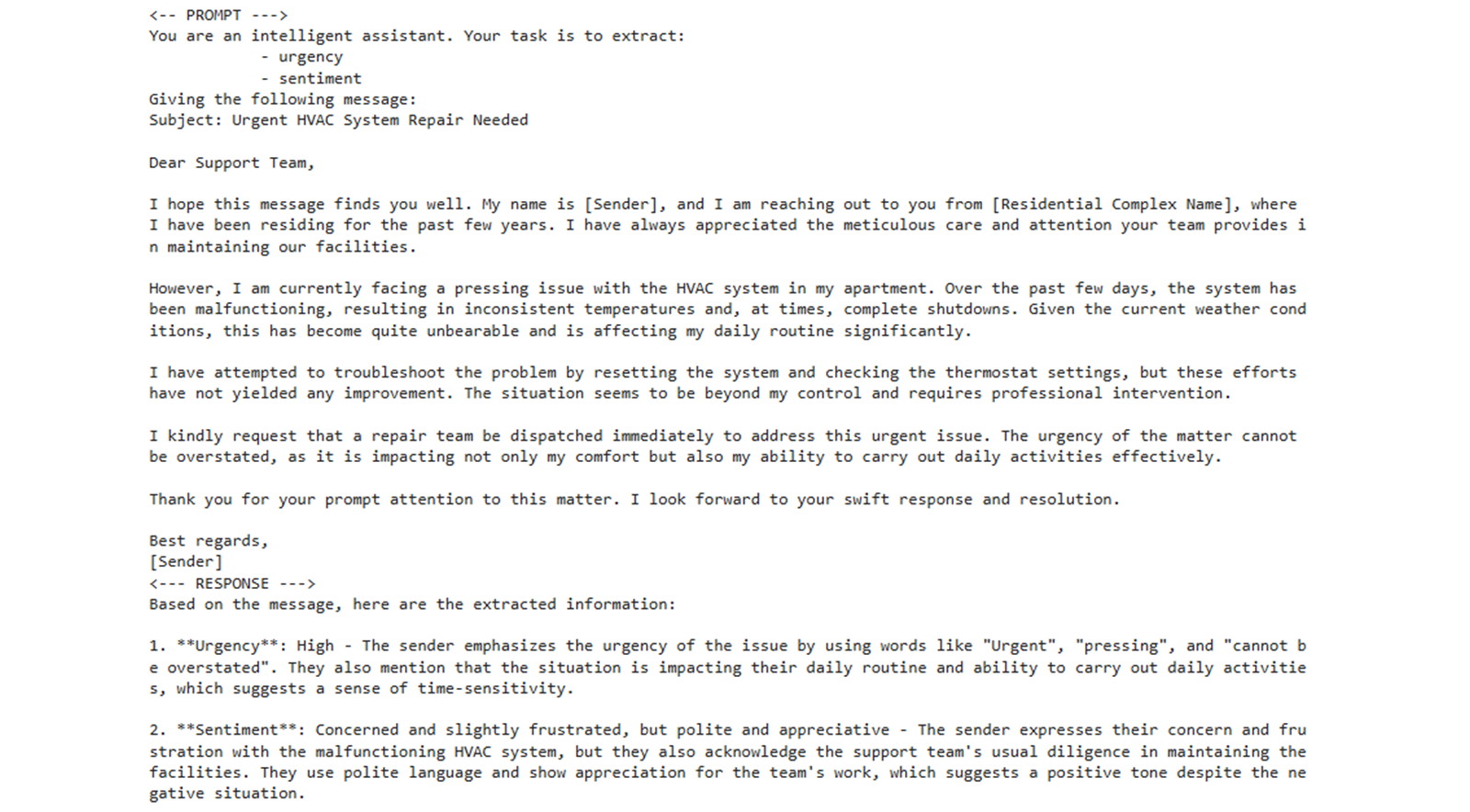
你可以看到以下输出:
你可以使用同一个函数来调用不同的模型。这是生成式 AI 中枢编排功能的一大优势。
当前冗长的响应对于我们将紧急程度和情感分配给电子邮件以便软件输入这一目标并不实用,因此我们应继续改进它。
注意
你得到的响应可能与此处所示略有不同,本学习旅程中展示的所有其余模型响应也是如此。
当你在自己的机器上执行相同提示时,LLM 会因其概率性质、temperature 设置和非确定性架构而产生不同的输出,即使设置发生细微变化或内部状态发生偏移,也会导致响应不同。
为紧急程度和情感赋值 :我们现在将分配一些基本的紧急程度和情感值,并执行该提示。
prompt_2 = Template(
messages=[
SystemMessage(
"""You are an intelligent assistant. Your task is to extract:
- "urgency" as one of {{?urgency}}
- "sentiment" as one of {{?sentiment}}
Giving the following message:"""
),
UserMessage("{{?input}}")
]
)
f_2 = partial(send_request, prompt=prompt_2, **option_lists)
response = f_2(input=mail["message"])
这段代码定义了一个提示,用于从给定消息中提取 "urgency" 和 "sentiment"。它使用 "partial" 函数通过预定义选项配置请求。最后,它通过配置好的请求处理电子邮件消息,以获取所需详细信息。这确保了从消息中提取一致且准确的数据。 你会得到一个响应。你会注意到紧急程度和情感的值基于所分配的取值。 3. 生成 JSON 输出 :软件需要特定格式的输入,为此选择了 JSON。JSON 是一个合适的选择,因为它是一种轻量级、与语言无关且易于解析的格式,能够实现高效的数据交换并简化开发。 我们使用以下代码:
prompt_3 = Template(
messages=[
SystemMessage(
"""You are an intelligent assistant. Extract and return a json with the follwoing keys and values:
- "urgency" as one of {{?urgency}}
- "sentiment" as one of {{?sentiment}}
Your complete message should be a valid json string that can be read directly and only contain the keys mentioned in the list above.
Giving the following message:"""
),
UserMessage("{{?input}}")
]
)
f_3 = partial(send_request, prompt=prompt_3, **option_lists)
response = f_3(input=mail["message"])
这段代码准备并发送一个请求,以从消息中提取特定信息。它使用预定义的提示模板指示系统提取 "urgency" 和 "sentiment",并以 JSON 格式返回。 "partial" 函数使用固定选项设置此请求,然后使用消息内容发送该请求。 你将看到一个 JSON 输出。 4. 确保 JSON 格式正确 :当前一个提示中的 JSON 输出格式不明确时,就需要这一步。你可以使用以下代码使其更清晰:
prompt_4 = Template(
messages=[
SystemMessage(
"""You are an intelligent assistant. Extract and return a json with the follwoing keys and values:
- "urgency" as one of {{?urgency}}
- "sentiment" as one of {{?sentiment}}
Your complete message should be a valid json string that can be read directly and only contain the keys mentioned in the list above. Never enclose it in ```json...```, no newlines, no unnessacary whitespaces.
Giving the following message:"""
),
UserMessage("{{?input}}")
]
)
f_4 = partial(send_request, prompt=prompt_4, **option_lists)
response = f_4(input=mail["message"])
这段代码定义了一个名为 "prompt_4" 的提示模板,其中规定了从输入消息中提取 "urgency" 和 "sentiment" 并以 JSON 字符串返回的指令。此提示给出了明确的指示,要求提供不含任何引号或空白的干净格式。 你会看到 JSON 输出现在很清晰。它已可供软件消费。 5. 基于业务职能的简单类别 :我们已经将紧急程度和情感关联到一封邮件。然而,我们还需要为每条消息添加更多标签,以便按业务需求对它们进行分类。我们可以从一个简单的代码开始。
prompt_5 = Template(
messages=[
SystemMessage(
"""You are an intelligent assistant. Assign a list of matching support category to the message.
Giving the following message:"""
),
UserMessage("{{?input}}")
]
)
f_5 = partial(send_request, prompt=prompt_5)
response = f_5(input=mail["message"])
这段代码设置了一个模板,用于根据用户消息分配支持类别。它准备一条系统消息来陈述助手的角色,纳入用户输入,并定义一个 partial 函数来发送请求。最后,它使用此函数处理消息并生成响应,帮助高效地对支持查询进行分类。 你会看到消息被分配了类别。响应为原始消息分配了支持类别,从而简化了客户支持流程。 6. 从列表为类别赋值 :上面生成的类别存在重叠的取值,例如紧急程度,应与公司定义的取值保持一致,以有效满足业务需求。
prompt_6 = Template(
messages=[
SystemMessage(
"""You are an intelligent assistant. Assign a list of best matching support category tags to the message:
{{?categories}}
Giving the following message:"""
),
UserMessage("{{?input}}")
]
)
# Prepare the options
option_lists = {
'categories': ', '.join(f"`{entry}`" for entry in categories),
}
# Create the partial function
f_6 = partial(send_request, prompt=prompt_6, **option_lists)
# Call it
response = f_6(input=mail["message"])
这段代码设置了一个模板,用于按支持类别对消息进行分类。它定义系统消息和用户消息,准备类别选项列表,并创建一个使用这些选项发送分类请求的函数。然后,它使用输入消息调用该函数以获取响应,从而根据消息内容有效地分配合适的标签。 你会看到类别被分配为列表中的取值。这些取值经过精简,便于业务处理。 7. 为类别取值生成 JSON 输出 :与前面的步骤 3 类似,我们需要 JSON 输出,以便在软件中处理这些取值。我们还要确保 JSON 输出的格式不含任何多余的符号或空格。 我们使用以下代码:
prompt_7 = Template(
messages=[
SystemMessage(
"""You are an intelligent assistant. Extract and return a json with the follwoing keys and values:
- "categories" list of the best matching support category tags from: {{?categories}}
Your complete message should be a valid json string that can be read directly and only contain the keys mentioned in the list above. Never enclose it in ```json...```, no newlines, no unnessacary whitespaces.
Giving the following message:"""
),
UserMessage("{{?input}}")
]
)
f_7 = partial(send_request, prompt=prompt_7, **option_lists)
response = f_7(input=mail["message"])
这段代码创建一个精确的提示模板,用于从输入消息中提取特定类别标签并以有效的 JSON 格式返回。然后它使用预定义函数 "send_request",配合构建好的提示和一些选项,从给定输入消息生成所需响应。这确保了数据提取的一致性和准确性。 你将看到 JSON 输出中的类别,可以在软件中处理。 8. 合并所有步骤 :我们已经使用 SAP Cloud SDK for AI (Python) - generative 逐步得到 JSON 格式的紧急程度、情感和类别的恰当取值。现在,让我们把所有这些步骤合并到一个提示中。
prompt_8 = Template(
messages=[
SystemMessage(
"""You are an intelligent assistant. Extract and return a json with the follwoing keys and values:
- "urgency" as one of {{?urgency}}
- "sentiment" as one of {{?sentiment}}
- "categories" list of the best matching support category tags from: {{?categories}}
Your complete message should be a valid json string that can be read directly and only contain the keys mentioned in the list above. Never enclose it in ```json...```, no newlines, no unnessacary whitespaces.
Giving the following message:"""
),
UserMessage("{{?input}}")
]
)
option_lists = {
'urgency': ', '.join(f"`{entry}`" for entry in urgency),
'sentiment': ', '.join(f"`{entry}`" for entry in sentiment),
'categories': ', '.join(f"`{entry}`" for entry in categories),
}
f_8 = partial(send_request, prompt=prompt_8, **option_lists)
response = f_8(input=mail["message"])
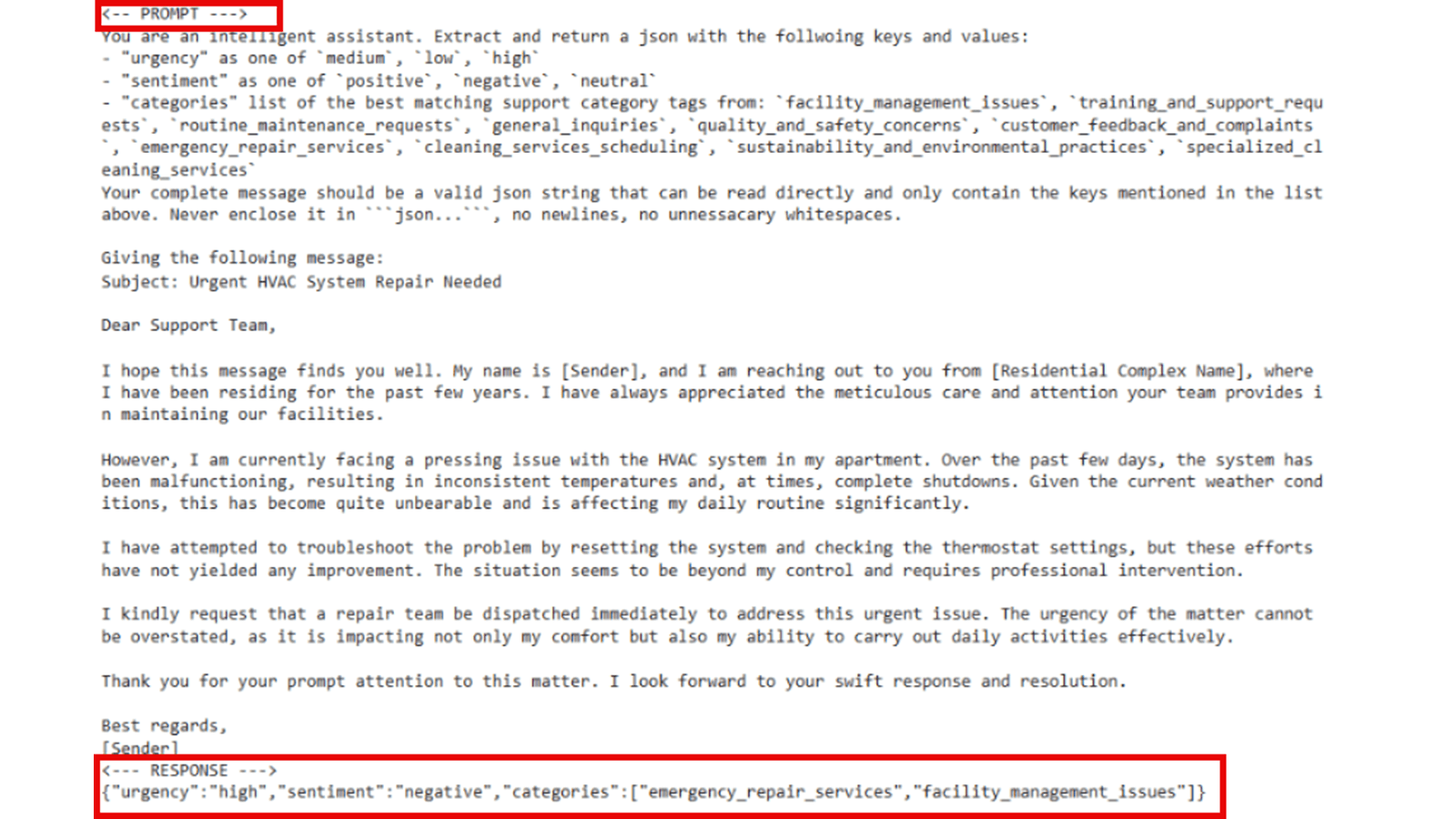
该代码将所有前面的步骤合并到一个提示中。它有助于处理电子邮件消息,以识别并返回关键信息。通过使用预定义模板,它提取紧急程度、情感和类别等详细信息,然后将它们格式化为 JSON 字符串。它通过使用给定参数调用函数,确保输出干净且可直接使用。 以下截图展示了这段代码的输出。 你可以看到合并后的输出,为客户消息分配了紧急程度、情感和类别,可在软件中使用。
你已成功开发出一个提示,朝着使用 SAP Cloud SDK for AI (Python) - generative 解决问题的方向迈进
本课总结
你已成功走完提示开发的迭代过程,从基本请求到高度精炼、可供应用使用的输出。通过利用 SAP Cloud SDK for AI 和生成式 AI 中枢的编排能力,你从一封电子邮件中提取了紧急程度、情感和类别等复杂信息,并将其格式化为软件可直接消费的干净 JSON。此过程凸显了持续优化提示是使用生成式 AI 解决真实业务问题的关键,而 SAP Cloud SDK for AI 让这一切变得简单。
本课其余配图
本课其余配图
本课其余配图
本课其余配图